TechDocs
Deploy OpenShift Data Foundation
Verify first if the OpenShift Data Foundation operator is installed on your cluster:
on 🎩 ❯ oc get csv -n openshift-storage
NAME                                               DISPLAY                            VERSION         REPLACES                         PHASE
cephcsi-operator.v4.20.13-rhodf                    CephCSI operator                   4.20.13-rhodf   cephcsi-operator.v4.20.12-rhodf                    Succeeded
mcg-operator.v4.20.13-rhodf                        NooBaa Operator                    4.20.13-rhodf   mcg-operator.v4.20.12-rhodf                        Succeeded
ocs-client-operator.v4.20.13-rhodf                 OpenShift Data Foundation Client   4.20.13-rhodf   ocs-client-operator.v4.20.12-rhodf                 Succeeded
ocs-operator.v4.20.13-rhodf                        OpenShift Container Storage        4.20.13-rhodf   ocs-operator.v4.20.12-rhodf                        Succeeded
odf-csi-addons-operator.v4.20.13-rhodf             CSI Addons                         4.20.13-rhodf   odf-csi-addons-operator.v4.20.12-rhodf             Succeeded
odf-dependencies.v4.20.13-rhodf                    Data Foundation Dependencies       4.20.13-rhodf   odf-dependencies.v4.20.12-rhodf                    Succeeded
odf-external-snapshotter-operator.v4.20.13-rhodf   Snapshot Controller                4.20.13-rhodf   odf-external-snapshotter-operator.v4.20.12-rhodf   Succeeded
odf-operator.v4.20.13-rhodf                        OpenShift Data Foundation          4.20.13-rhodf   odf-operator.v4.20.12-rhodf                        Succeeded
odf-prometheus-operator.v4.20.13-rhodf             Prometheus Operator                4.20.13-rhodf   odf-prometheus-operator.v4.20.12-rhodf             Succeeded
recipe.v4.20.13-rhodf                              Recipe                             4.20.13-rhodf   recipe.v4.20.12-rhodf                              Succeeded
rhdh-operator.v1.10.0                              Red Hat Developer Hub Operator     1.10.0          rhdh-operator.v1.9.4                               Succeeded
rook-ceph-operator.v4.20.13-rhodf                  Rook-Ceph                          4.20.13-rhodf   rook-ceph-operator.v4.20.12-rhodf                  Succeeded
If you get a similar output, then your system is already prepared to continue. Otherwise, you must install following this instructions.
Installing this operator takes a while, so, wait until all of them are successfully installed before continuing with the next step.
Create the storage system following this instructions.
Create Storage
Create a new Storage component by OpenShift Data Foundation in the same namespace where Red Hat Developer Hub is running:
oc apply -f ./content/modules/ROOT/examples/exercises/rhdh-techdocs-bucket-claim-obc-8.yaml -n rhdh-gitlabOnce the object is created, a new ConfigMap and Secret are created both with the
name of the ObjectBucketClaim resource. In our case, rhdh-techdocs-bucket-claim.
These resources include a set of properties to identify the new bucket in AWS.
-
AWS_ACCESS_KEY_ID,AWS_SECRET_ACCESS_KEYas credentials of this new bucket -
BUCKET_HOST,BUCKET_NAME, … to identify the new bucket
Some of these values are needed in the following steps.
Deploy GitLab runner
Install GitLab Runner operator:
oc apply -f ./content/modules/ROOT/examples/exercises/gitlab-runner-operator-8.yaml -n gitlab-systemon 🎩 ❯ oc get csv -n gitlab-system
NAME DISPLAY VERSION REPLACES PHASE
gitlab-runner-operator.v1.49.1 GitLab Runner 1.49.1 gitlab-runner-operator.v1.49.0 SucceededThe technical docs will be created as part of the CI pipelines of the components, so we need to set up the GitLab instance to run pipelines and use some variables to identify the new bucket to store the results.
Deploy a GitLab runner to run pipelines:
envsubst < ./content/modules/ROOT/examples/exercises/gitlab-runner-8.yaml | oc apply -n gitlab-system -f -GitLab requires a set of CI variables to run successfully the techdocs pipelines.
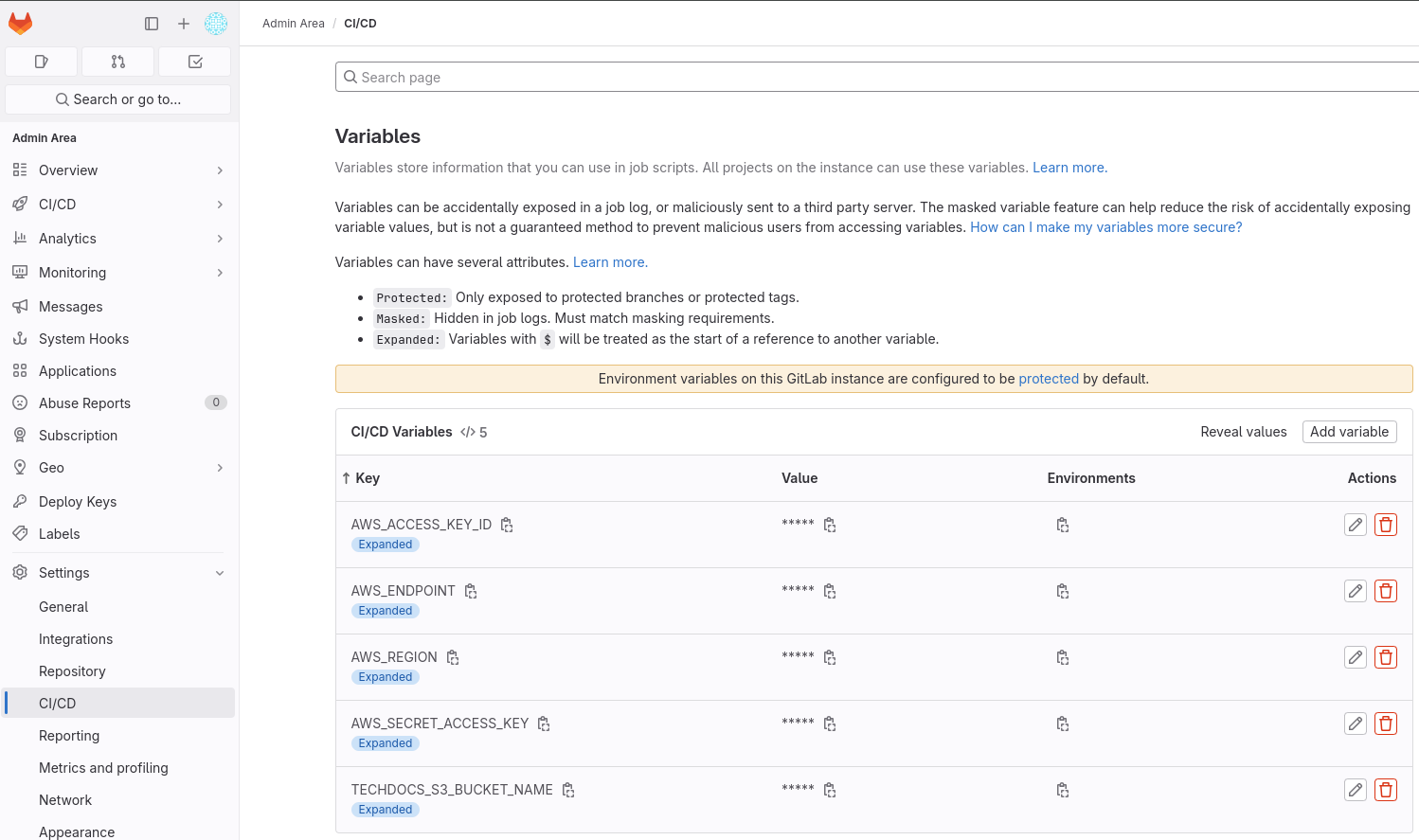
Login as root into GitLab and add these variables in :
-
AWS_ENDPOINT: Output of the commandoc get route s3 -n openshift-storage -o jsonpath='https://{.spec.host}' -
AWS_ACCESS_KEY_ID: Value of the same variable fromrhdh-techdocs-bucket-claimSecret -
AWS_SECRET_ACCESS_KEY: Value of the same variable fromrhdh-techdocs-bucket-claimSecret -
TECHDOCS_S3_BUCKET_NAME: Value ofBUCKET_NAMEvariable fromrhdh-techdocs-bucket-claimConfigMap -
AWS_REGION:us-east-2
The configuration should be similar to:
Set up techdocs plugin
Patch the rhdh-secrets secret to add the AWS_REGION and BUCKET_URL variables:
export AWS_REGION=$(echo -n 'us-east-2' | base64 -w0)
export BUCKET_URL=$(oc get route s3 -n openshift-storage -o jsonpath='https://{.spec.host}' | base64 -w0)
oc patch secret rhdh-secrets -n rhdh-gitlab -p '{"data":{"AWS_REGION":"'"${AWS_REGION}"'"}}'
oc patch secret rhdh-secrets -n rhdh-gitlab -p '{"data":{"BUCKET_URL":"'"${BUCKET_URL}"'"}}'
Add the rhdh-techdocs-bucket-claim ConfigMap and Secret to the Red Hat Developer Hub deployment.
    extraEnvs:
      envs:
        # Disabling TLS verification
        - name: NODE_TLS_REJECT_UNAUTHORIZED
          value: '0'
      configMaps:
        - name: rhdh-techdocs-bucket-claim
      secrets:
        - name: gitlab-secrets
        - name: rhdh-secrets
        - name: rhdh-techdocs-bucket-claim
And apply changes to the application configuration:
    techdocs:
      builder: 'external'
      generator:
        runIn: 'local'
      publisher:
        type: 'awsS3'
        awsS3:
          bucketName: ${BUCKET_NAME}
          endpoint: ${BUCKET_URL}
          s3ForcePathStyle: true
          region: ${AWS_REGION}
          credentials:
            accessKeyId: ${AWS_ACCESS_KEY_ID}
            secretAccessKey: ${AWS_SECRET_ACCESS_KEY}
Or run:
oc apply -f ./content/modules/ROOT/examples/exercises/rhdh-app-configmap-8.yaml -n rhdh-gitlab
oc apply -f ./content/modules/ROOT/examples/exercises/rhdh-instance-8.yaml -n rhdh-gitlab
Modify the content of the docs/index.md file of your component, check the CI pipeline
is executed successfully and verify the technical content in Red Hat Developer Hub.