<?xml version="1.0" encoding="utf-8"?><feed xmlns="http://www.w3.org/2005/Atom" ><generator uri="https://jekyllrb.com/" version="3.10.0">Jekyll</generator><link href="http://blog.jromanmartin.io/feed.xml" rel="self" type="application/atom+xml" /><link href="http://blog.jromanmartin.io/" rel="alternate" type="text/html" /><updated>2025-07-02T12:49:44+00:00</updated><id>http://blog.jromanmartin.io/feed.xml</id><title type="html">Roman’s Blog</title><subtitle>My personal blog about any kind of technical topics (integration, messaging, developing, ...).
</subtitle><author><name>Roman Martin</name></author><entry><title type="html">:tada: New article published in Red Hat Developer!</title><link href="http://blog.jromanmartin.io/2023/09/20/new-article-rhd.html" rel="alternate" type="text/html" title=":tada: New article published in Red Hat Developer!" /><published>2023-09-20T07:00:00+00:00</published><updated>2023-09-20T07:00:00+00:00</updated><id>http://blog.jromanmartin.io/2023/09/20/new-article-rhd</id><content type="html" xml:base="http://blog.jromanmartin.io/2023/09/20/new-article-rhd.html"><![CDATA[<p>I am honored to announce that a new article from mine was published at <a href="https://developers.redhat.com/">Red Hat Developer</a> community.
The <a href="https://developers.redhat.com/articles/2023/09/20/automate-your-amq-streams-platform-ansible">Automate your AMQ streams platform with Ansible</a>
describes how deploy Apache Kakfa clusters using the <a href="https://galaxy.ansible.com/middleware_automation/amq_streams">AMQ Streams Collection</a> of the
<a href="https://github.com/ansible-middleware">Ansible Middleware</a> community.</p>

<p>This blog post is the result of my contributions and collaboration with this amazing community to automate the most tipical operations of an
Apache Kafka cluster. The collection is under development but this post summarize the most important topics and shows an example of the most
tipical deployment topology of an Apache Kafka cluster.</p>

<p>I would like to thank <a href="https://developers.redhat.com/author/romain-pelisse">Romain Pelisse</a> who helped me a lot in my contributions, testing my implementations,
and teaching me a lot of great things about Ansible.</p>

<p>I hope this new article helps you when you need to automate your Apache Kafka cluster on RHEL/Fedora environments.</p>

<p>My full list of articles are available for your records <a href="/articles">here</a>. As usual, comments, ideas, PRs are welcomed!</p>

<p>Happy coding !!! 💻💾💿☕</p>]]></content><author><name>Roman Martin</name></author><category term="How-to" /><category term="Red Hat OpenShift" /><category term="Apache Kafka" /><category term="Red Hat AMQ Streams" /><category term="Ansible" /><category term="Tutorial" /><category term="Community" /><category term="tools" /><summary type="html"><![CDATA[How to automate your AMQ streams platform with Ansible article is available for you.]]></summary></entry><entry><title type="html">📛 Improving a GitHub Repo (II)!</title><link href="http://blog.jromanmartin.io/2023/06/20/Improving-a-gh-repository-ii.html" rel="alternate" type="text/html" title="📛 Improving a GitHub Repo (II)!" /><published>2023-06-20T07:00:00+00:00</published><updated>2023-06-20T07:00:00+00:00</updated><id>http://blog.jromanmartin.io/2023/06/20/Improving-a-gh-repository-ii</id><content type="html" xml:base="http://blog.jromanmartin.io/2023/06/20/Improving-a-gh-repository-ii.html"><![CDATA[<p>My first post of <a href="https://blog.jromanmartin.io/2023/06/12/Improving-a-gh-repository.html">📛 Improving a GitHub Repo</a> describes
many good things to add in any GitHub repository to be more productive and professional. However, that stuff can be hard
to do every time a new repository is created, and we can forget to add something great. I found a way to accelerate this process
and also do not forget to add anything great: <a href="https://docs.github.com/en/repositories/creating-and-managing-repositories/creating-a-template-repository">GitHub Repository templates</a>.</p>

<p>GitHub template repository is the best way to replicate an standard structure, including folders, documentation, workflows, branches, and
any file required to set up a new project. Using this pattern we can homogenize the structure of any repository of your organization,
or also your own projects, easily and saving a lot of time. If you need to standardize your projects, or you need to create many projects
on demand, definitely a template repository is your tool.</p>

<p>As summary, the most great benefits of using repository template I found are:</p>

<ul>
  <li>⌛ Spend less time repeating code</li>
  <li>🌟 Focus on building new things</li>
  <li>🦾 Less manual configuration</li>
  <li>📝 Sharing boilerplate code across the code base</li>
</ul>

<p>And, the main features of a repository template are:</p>

<ul>
  <li>Copy the entire repository files to a brand new repository</li>
  <li>Every template has a new url endpoint called <code class="language-plaintext highlighter-rouge">/generate</code></li>
  <li>Share repository template through your organization or other GitHub users</li>
</ul>

<h2 id="my-own-repository-template">My own repository template</h2>

<p>I create mw own GitHub Template repository in here: <a href="https://github.com/rmarting/gh-repo-template">https://github.com/rmarting/gh-repo-template</a> including
all the things described in my previous <a href="https://blog.jromanmartin.io/2023/06/12/Improving-a-gh-repository.html">post</a>, or new things added along the time.</p>

<p>My template repository includes things such as:</p>

<ul>
  <li>Initial content files aligned with the common patterns in any Open Source project: Contribution guide, Code of Conduct, contributors, …</li>
  <li>GitHub templates to report issues or open Pull Requests.</li>
  <li>Standard badges to summarize the repository.</li>
  <li>Standard workflows to release versions, or to implement Continuous Integration pipelines</li>
</ul>

<p>So, creating a new repository and setting up it takes few seconds and steps. Amazing!!!</p>

<p>Do you have ideas, or comments about how to improve a template repository? Looking forward to hearing you with more contributions into
my template repo, or adding comments in this post.</p>

<p>🤖🚩 Happy creation of new projects!!! 🤖🚩</p>

<p style="text-align: center;"><a href="http://blog.jromanmartin.io/images/bitmoji/happy-coding.avif"><img src="/images/bitmoji/happy-coding.avif" alt="" title="Happy coding!!!" /></a></p>]]></content><author><name>Roman Martin</name></author><category term="Community" /><category term="GitHub" /><category term="git" /><category term="productivity" /><category term="How-to" /><category term="Tutorial" /><category term="development" /><category term="CICD" /><category term="tools" /><summary type="html"><![CDATA[How to use a GitHub template repository to setting up your repository fast and easily.]]></summary></entry><entry><title type="html">🖭 How to resize a virtual disk</title><link href="http://blog.jromanmartin.io/2023/06/16/how-resize-virtual-disk-image.html" rel="alternate" type="text/html" title="🖭 How to resize a virtual disk" /><published>2023-06-16T07:00:00+00:00</published><updated>2023-06-16T07:00:00+00:00</updated><id>http://blog.jromanmartin.io/2023/06/16/how-resize-virtual-disk-image</id><content type="html" xml:base="http://blog.jromanmartin.io/2023/06/16/how-resize-virtual-disk-image.html"><![CDATA[<p>If you work with VMs it is very common that sometimes you need more space, but your VMs were
defined with an estimated size. I started to use Virtual Machine Manager to manage my VMs when I
joined to Red Hat (sorry but in my previous life I usually used Oracle VM VirtualBox) and
sometimes I need to resize my image files but I didn’t know how to do it.</p>

<p>Thanks to <a href="https://github.com/oarribas">Oscar Arribas Arribas</a> I learned to do it using a few
<code class="language-plaintext highlighter-rouge">virt-xxx</code> commands. It is very possible to do it using other commands/steps/alternatives however
this way is good for me.</p>

<h2 id="step-0️⃣---checking-current-vm-disk-size">Step 0️⃣ - Checking current VM disk size</h2>

<p>Inside of your VM you can check the size of the each disk with the <code class="language-plaintext highlighter-rouge">df</code> command:</p>

<div class="language-shell highlighter-rouge"><div class="highlight"><pre class="highlight"><code><span class="o">[</span>rhmw@f38mw01 ~]<span class="nv">$ </span><span class="nb">df</span> <span class="nt">-h</span>
Filesystem      Size  Used Avail Use% Mounted on
devtmpfs        4.0M     0  4.0M   0% /dev
tmpfs           977M     0  977M   0% /dev/shm
tmpfs           391M  1.3M  390M   1% /run
/dev/vda3        19G  4.7G   14G  26% /
tmpfs           977M   40K  977M   1% /tmp
/dev/vda3        19G  4.7G   14G  26% /home
/dev/vda2       974M  257M  650M  29% /boot
tmpfs           196M   56K  196M   1% /run/user/42
tmpfs           196M   40K  196M   1% /run/user/1000
</code></pre></div></div>

<p>Here the <code class="language-plaintext highlighter-rouge">home</code> has 20G allocated. I would like to extend it to 40G.</p>

<h2 id="step-1️⃣---creating-a-new-disk-image">Step 1️⃣ - Creating a new disk image</h2>

<p>Your VM must be stopped before starting to resize it using a new disk image with the
desired size.</p>

<p>We can create a new disk using the <code class="language-plaintext highlighter-rouge">qemu-img</code> tool, something like this:</p>

<div class="language-shell highlighter-rouge"><div class="highlight"><pre class="highlight"><code>on 🎩 ❯ qemu-img create <span class="nt">-f</span> qcow2 f38mw01-resized.qcow2 40G
Formatting <span class="s1">'f38mw01-resized.qcow2'</span>, <span class="nb">fmt</span><span class="o">=</span>qcow2 <span class="nv">cluster_size</span><span class="o">=</span>65536 <span class="nv">extended_l2</span><span class="o">=</span>off <span class="nv">compression_type</span><span class="o">=</span>zlib <span class="nv">size</span><span class="o">=</span>42949672960 <span class="nv">lazy_refcounts</span><span class="o">=</span>off <span class="nv">refcount_bits</span><span class="o">=</span>16
</code></pre></div></div>

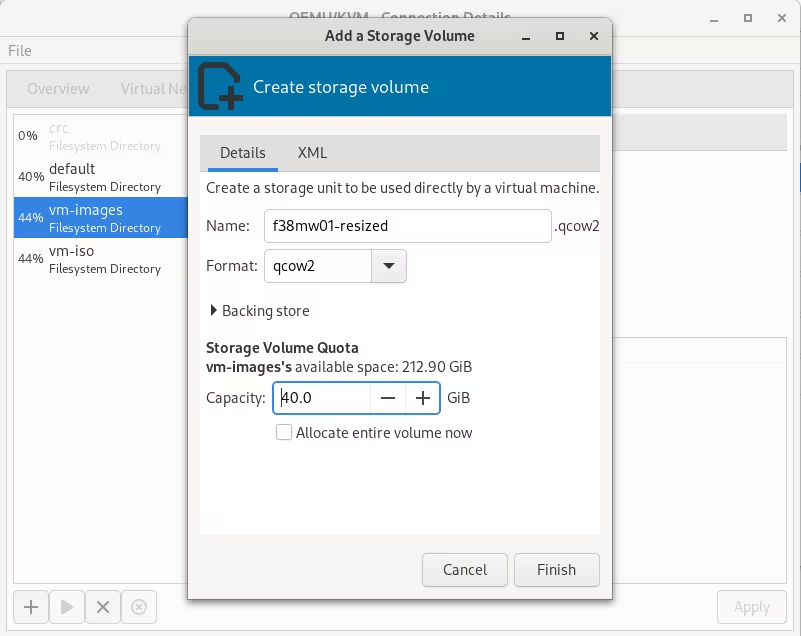
<p>Or creating the new image file by the Storage tab in the <code class="language-plaintext highlighter-rouge">virt-manager</code> Connection Details option (Edit -&gt; Connection Details):</p>

<p style="text-align: center;"><a href="http://blog.jromanmartin.io/images/2023/06/vm/vm-resize.avif"><img src="/images/2023/06/vm/vm-resize.avif" alt="" title="New disk image with more space" /></a></p>

<h2 id="step-2️⃣---renaming-the-old-disk-image">Step 2️⃣ - Renaming the old disk image</h2>

<p>Rename the old image file as a backup file (it could be needed to use in a roll-back case):</p>

<div class="language-shell highlighter-rouge"><div class="highlight"><pre class="highlight"><code><span class="nb">mv </span>f38mw01.qcow2 f38mw01.qcow2.backup
</code></pre></div></div>

<p>You can also describe the file systems in the old image file:</p>

<div class="language-shell highlighter-rouge"><div class="highlight"><pre class="highlight"><code>on 🎩 ❯ <span class="nb">sudo </span>virt-filesystems <span class="nt">--long</span> <span class="nt">-h</span> <span class="nt">--all</span> <span class="nt">-a</span> f38mw01.qcow2.backup
Name                                     Type       VFS     Label                 MBR Size Parent
/dev/sda1                                filesystem unknown -                     -   1.0M -
/dev/sda2                                filesystem ext4    -                     -   973M -
/dev/sda3                                filesystem btrfs   fedora_localhost-live -   19G  -
btrfsvol:/dev/sda3/home                  filesystem btrfs   fedora_localhost-live -   -    -
btrfsvol:/dev/sda3/root                  filesystem btrfs   fedora_localhost-live -   -    -
btrfsvol:/dev/sda3/root/var/lib/machines filesystem btrfs   fedora_localhost-live -   -    -
/dev/sda1                                partition  -       -                     -   1.0M /dev/sda
/dev/sda2                                partition  -       -                     -   1.0G /dev/sda
/dev/sda3                                partition  -       -                     -   19G  /dev/sda
/dev/sda                                 device     -       -                     -   20G  -
</code></pre></div></div>

<h2 id="step-3️⃣---truncating-the-new-disk-image">Step 3️⃣ - Truncating the new disk image</h2>

<p>Truncate the old image file and resize the new image file with the new space:</p>

<div class="language-shell highlighter-rouge"><div class="highlight"><pre class="highlight"><code>on 🎩 ❯ <span class="nb">sudo truncate</span> <span class="nt">-r</span> f38mw01.qcow2.backup f38mw01-resized.qcow2
on 🎩 ❯ <span class="nb">sudo truncate</span> <span class="nt">-s</span> +20G f38mw01-resized.qcow2
</code></pre></div></div>

<h2 id="step-4️⃣---expanding-the-new-disk-image">Step 4️⃣ - Expanding the new disk image</h2>

<p>Expand the new image file using as base the old image file. In this step I am expanding the physical disk mounted
for the <code class="language-plaintext highlighter-rouge">home</code> folder.</p>

<div class="language-shell highlighter-rouge"><div class="highlight"><pre class="highlight"><code>on 🎩 ❯ <span class="nb">sudo </span>virt-resize <span class="nt">--expand</span> /dev/sda3 f38mw01.qcow2.backup f38mw01-resized.qcow2
<span class="o">[</span>   0.0] Examining f38mw01.qcow2.backup
<span class="k">**********</span>

Summary of changes:

virt-resize: /dev/sda1: This partition will be left alone.

virt-resize: /dev/sda2: This partition will be left alone.

virt-resize: /dev/sda3: This partition will be resized from 19.0G to 39.0G. 
 The filesystem btrfs on /dev/sda3 will be expanded using the 
‘btrfs-filesystem-resize’ method.

<span class="k">**********</span>
<span class="o">[</span>   2.6] Setting up initial partition table on f38mw01-resized.qcow2
<span class="o">[</span>  13.4] Copying /dev/sda1
<span class="o">[</span>  13.4] Copying /dev/sda2
 100% ⟦▒▒▒▒▒▒▒▒▒▒▒▒▒▒▒▒▒▒▒▒▒▒▒▒▒▒▒▒▒▒▒▒▒▒▒▒▒▒▒▒▒▒▒▒▒▒▒▒▒▒▒▒▒▒▒▒▒▒▒▒▒▒▒▒▒▒▒▒▒▒▒▒▒▒▒▒▒▒▒▒▒▒▒▒▒▒▒▒▒▒▒▒▒▒▒▒▒▒▒▒▒▒▒▒▒▒▒▒▒▒▒▒▒▒▒▒▒▒▒▒▒▒▒▒▒▒▒▒▒▒▒▒▒▒▒▒▒▒▒▒▒▒▒▒▒▒▒▒▒▒▒▒▒▒▒▒▒▒▒▒▒▒▒▒▒▒▒▒▒▒▒▒▒▒▒▒▒▒▒▒▒▒▒▒▒▒▒▒▒▒▒▒▒▒▒▒▒▒▒▒▒▒▒▒▒▒▒▒▒▒▒▒▒▒▒▒▒▒▒▒▒▒▒⟧ <span class="nt">--</span>:--
<span class="o">[</span>  15.8] Copying /dev/sda3
 100% ⟦▒▒▒▒▒▒▒▒▒▒▒▒▒▒▒▒▒▒▒▒▒▒▒▒▒▒▒▒▒▒▒▒▒▒▒▒▒▒▒▒▒▒▒▒▒▒▒▒▒▒▒▒▒▒▒▒▒▒▒▒▒▒▒▒▒▒▒▒▒▒▒▒▒▒▒▒▒▒▒▒▒▒▒▒▒▒▒▒▒▒▒▒▒▒▒▒▒▒▒▒▒▒▒▒▒▒▒▒▒▒▒▒▒▒▒▒▒▒▒▒▒▒▒▒▒▒▒▒▒▒▒▒▒▒▒▒▒▒▒▒▒▒▒▒▒▒▒▒▒▒▒▒▒▒▒▒▒▒▒▒▒▒▒▒▒▒▒▒▒▒▒▒▒▒▒▒▒▒▒▒▒▒▒▒▒▒▒▒▒▒▒▒▒▒▒▒▒▒▒▒▒▒▒▒▒▒▒▒▒▒▒▒▒▒▒▒▒▒▒▒▒▒▒⟧ 00:00
<span class="o">[</span>  48.0] Expanding /dev/sda3 using the ‘btrfs-filesystem-resize’ method

virt-resize: Resize operation completed with no errors.  Before deleting 
the old disk, carefully check that the resized disk boots and works 
correctly.
</code></pre></div></div>

<h2 id="step-5️⃣---starting-the-vm-with-the-new-disk-image">Step 5️⃣ - Starting the VM with the new disk image</h2>

<p>Rename the new disk image as the original one used by the VM:</p>

<div class="language-shell highlighter-rouge"><div class="highlight"><pre class="highlight"><code>on 🎩 ❯ <span class="nb">mv </span>f38mw01-resized.qcow2 f38mw01.qcow2
</code></pre></div></div>

<p>Start the VM and the check that our <code class="language-plaintext highlighter-rouge">home</code> has more space:</p>

<div class="language-shell highlighter-rouge"><div class="highlight"><pre class="highlight"><code><span class="o">[</span>rhmw@f38mw01 ~]<span class="nv">$ </span><span class="nb">df</span> <span class="nt">-h</span>
Filesystem      Size  Used Avail Use% Mounted on
devtmpfs        4.0M     0  4.0M   0% /dev
tmpfs           977M     0  977M   0% /dev/shm
tmpfs           391M  1.3M  390M   1% /run
/dev/vda3        39G  4.7G   34G  13% /
tmpfs           977M   40K  977M   1% /tmp
/dev/vda2       974M  257M  650M  29% /boot
/dev/vda3        39G  4.7G   34G  13% /home
tmpfs           196M   56K  196M   1% /run/user/42
tmpfs           196M   40K  196M   1% /run/user/1000
</code></pre></div></div>

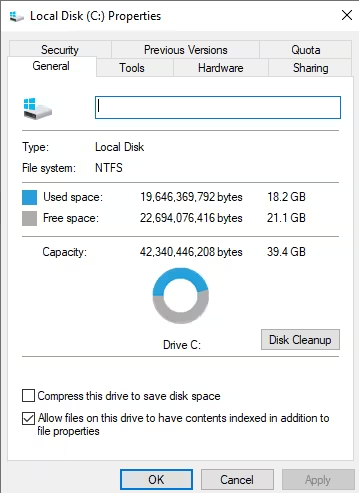
<p>The <code class="language-plaintext highlighter-rouge">/dev/vda3</code> now is 34G (in the step 0, the size was 19G). Great!!!</p>

<h2 id="bonus-track----resizing-microsoft-windows-vms">Bonus Track 💡 - Resizing Microsoft Windows VMs</h2>

<p>I know, I know what you are thinking 🤔 … this stuff works because I am using a Linux OS 😇. However,
this process also works for Windows VMs.</p>

<p>Here an example of a Windows 10 with a hard disk of 40G to extend to 50G:</p>

<p style="text-align: center;"><a href="http://blog.jromanmartin.io/images/2023/06/vm/vm-win10-40g.avif"><img src="/images/2023/06/vm/vm-win10-40g.avif" alt="" title="40G in my hard disk!" /></a></p>

<p>The process is exactly the same:</p>

<p>Create new disk image:</p>

<div class="language-shell highlighter-rouge"><div class="highlight"><pre class="highlight"><code>on 🎩 ❯ qemu-img create <span class="nt">-f</span> qcow2 win10-resized.qcow2 50G
Formatting <span class="s1">'win10-resized.qcow2'</span>, <span class="nb">fmt</span><span class="o">=</span>qcow2 <span class="nv">cluster_size</span><span class="o">=</span>65536 <span class="nv">extended_l2</span><span class="o">=</span>off <span class="nv">compression_type</span><span class="o">=</span>zlib <span class="nv">size</span><span class="o">=</span>53687091200 <span class="nv">lazy_refcounts</span><span class="o">=</span>off <span class="nv">refcount_bits</span><span class="o">=</span>16
</code></pre></div></div>

<p>Back the original disk image:</p>

<div class="language-shell highlighter-rouge"><div class="highlight"><pre class="highlight"><code>on 🎩 ❯ <span class="nb">mv </span>win10.qcow2 win10.qcow2.backup
</code></pre></div></div>

<p>Check the file systems of the old image:</p>

<div class="language-shell highlighter-rouge"><div class="highlight"><pre class="highlight"><code>on 🎩 ❯ <span class="nb">sudo </span>virt-filesystems <span class="nt">--long</span> <span class="nt">-h</span> <span class="nt">--all</span> <span class="nt">-a</span> win10.qcow2.backup 
Name       Type        VFS   Label            MBR  Size  Parent
/dev/sda1  filesystem  ntfs  System Reserved  -    579M  -
/dev/sda2  filesystem  ntfs  -                -    39G   -
/dev/sda1  partition   -     -                07   579M  /dev/sda
/dev/sda2  partition   -     -                07   39G   /dev/sda
/dev/sda   device      -     -                -    40G   -
</code></pre></div></div>

<p>Truncate the new disk image:</p>

<div class="language-shell highlighter-rouge"><div class="highlight"><pre class="highlight"><code>on 🎩 ❯ <span class="nb">sudo truncate</span> <span class="nt">-r</span> win10.qcow2.backup win10-resized.qcow2 
on 🎩 ❯ <span class="nb">sudo truncate</span> <span class="nt">-s</span> +10G win10-resized.qcow2 
</code></pre></div></div>

<p>Expand the new disk image:</p>

<div class="language-shell highlighter-rouge"><div class="highlight"><pre class="highlight"><code>on 🎩 ❯ <span class="nb">sudo </span>virt-resize <span class="nt">--expand</span> /dev/sda2 win10.qcow2.backup win10-resized.qcow2 
<span class="o">[</span>   0.0] Examining win10.qcow2.backup
<span class="k">**********</span>

Summary of changes:

virt-resize: /dev/sda1: This partition will be left alone.

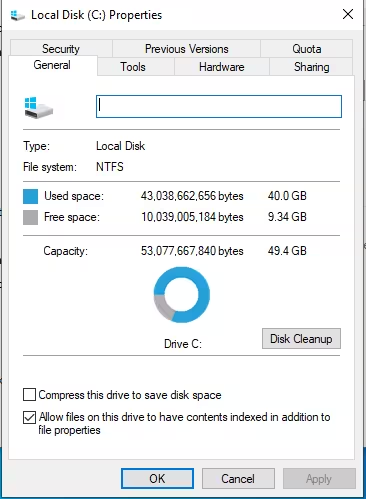
virt-resize: /dev/sda2: This partition will be resized from 39.4G to 49.4G. 
 The filesystem ntfs on /dev/sda2 will be expanded using the 
‘ntfsresize’ method.

<span class="k">**********</span>
<span class="o">[</span>   1.9] Setting up initial partition table on win10-resized.qcow2
<span class="o">[</span>   2.8] Copying /dev/sda1
<span class="o">[</span>   3.6] Copying /dev/sda2
 100% ⟦▒▒▒▒▒▒▒▒▒▒▒▒▒▒▒▒▒▒▒▒▒▒▒▒▒▒▒▒▒▒▒▒▒▒▒▒▒▒▒▒▒▒▒▒▒▒▒▒▒▒▒▒▒▒▒▒▒▒▒▒▒▒▒▒▒▒▒▒▒▒▒▒▒▒▒▒▒▒▒▒▒▒▒▒▒▒▒▒▒▒▒▒▒▒▒▒▒▒▒▒▒▒▒▒▒▒▒▒▒▒▒▒▒▒▒▒▒▒▒▒▒▒▒▒▒▒▒▒▒▒▒▒▒▒▒▒▒▒▒▒▒▒▒▒▒▒▒▒▒▒▒▒▒▒▒▒▒▒▒▒▒▒▒▒▒▒▒▒▒▒▒▒▒▒▒▒▒▒▒▒▒▒▒▒▒▒▒▒▒▒▒▒▒▒▒▒▒▒⟧ 00:00
<span class="o">[</span>  55.7] Expanding /dev/sda2 using the ‘ntfsresize’ method

virt-resize: Resize operation completed with no errors.  Before deleting 
the old disk, carefully check that the resized disk boots and works 
correctly.
</code></pre></div></div>

<p>Rename the new disk using the original name</p>

<div class="language-shell highlighter-rouge"><div class="highlight"><pre class="highlight"><code>on 🎩 ❯ <span class="nb">mv </span>win10-resized.qcow2 win10.qcow2
</code></pre></div></div>

<p>Start the VM and check the new disk size:</p>

<p style="text-align: center;"><a href="http://blog.jromanmartin.io/images/2023/06/vm/vm-win10-50g.avif"><img src="/images/2023/06/vm/vm-win10-50g.avif" alt="" title="Now 50G in my hard disk!" /></a></p>

<p>🚩 Happy resizing!!! 🤖</p>

<p style="text-align: center;"><a href="http://blog.jromanmartin.io/images/bitmoji/the-end.avif"><img src="/images/bitmoji/the-end.avif" alt="" title="That's all!!!" /></a></p>]]></content><author><name>Roman Martin</name></author><category term="Community" /><category term="productivity" /><category term="tools" /><category term="How-to" /><category term="tutorial" /><summary type="html"><![CDATA[Tutorial to resize a virtual disk to a new size.]]></summary></entry><entry><title type="html">📛 Improving a GitHub Repo!</title><link href="http://blog.jromanmartin.io/2023/06/12/Improving-a-gh-repository.html" rel="alternate" type="text/html" title="📛 Improving a GitHub Repo!" /><published>2023-06-12T07:00:00+00:00</published><updated>2023-06-12T07:00:00+00:00</updated><id>http://blog.jromanmartin.io/2023/06/12/Improving-a-gh-repository</id><content type="html" xml:base="http://blog.jromanmartin.io/2023/06/12/Improving-a-gh-repository.html"><![CDATA[<p>I have been using <a href="https://github.com">GitHub</a> for a long time and I spent time on a daily
basis reviewing repos in the Open Source space. One of the most important things
, from my point of view, is to get a good overview of the repository, a good documentation,
but also good highlights, such as releases, status of the project, Changelogs, Contribution
Guides, emojis (<a href="https://blog.jromanmartin.io/2020/09/28/why-i-use-emoji-in-my-git-commits.html">why not?</a>) …
so I can get faster a good summary of the repository. This is not easy and
there are many different ways to do it, but I found some of them very easy to add in any repository.</p>

<p>This post covers two of these mechanisms to improve any GitHub Repository:</p>

<ul>
  <li>📛 Repository Badges</li>
  <li>✅ Changelogs and 🤖🚩automatic releasing process</li>
</ul>

<h2 id="-repository-badges">📛 Repository Badges</h2>

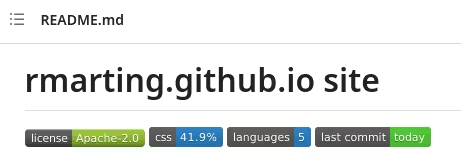
<p>How does it look like a repo with badges? Something like this:</p>

<p style="text-align: center;"><a href="http://blog.jromanmartin.io/images/2023/06/github/gh-repo-badges.avif"><img src="/images/2023/06/github/gh-repo-badges.avif" alt="" title="GitHub repo with badges" /></a></p>

<p>Nice 🫶, right?</p>

<p>Badges are an easy way to summarize a repo with information about topics such
as building, test results, license, pipelines or workflows, versions, … This information
provides quality metadata coming from many different resources. So meanwhile you are browsing,
you get all this information in a single view. Incredible!</p>

<p>I found a simple way to integrate almost any badge in my repository …
<a href="https://shields.io/">Shields.io</a>. It is a service providing badges in different formats to
integrate in GitHub readme files. This service supports a bunch of continuous integration
services, package registries, distributions, app stores, social networks, code coverage services,
and code analysis services (anything else? 🤷🏽‍♀️).</p>

<p>In short, using the web site you can customize your badge to your own requisites and 3rd party
services, getting a code to add in your GitHub readme easily.</p>

<p>For example, the previous image is rendered using the next entries in my readme file of my
Blog site repository:</p>

<div class="language-markdown highlighter-rouge"><div class="highlight"><pre class="highlight"><code><span class="p">![</span><span class="nv">License</span><span class="p">](</span><span class="sx">https://img.shields.io/github/license/rmarting/rmarting.github.io?style=plastic</span><span class="p">)</span>
<span class="p">![</span><span class="nv">Main Lang</span><span class="p">](</span><span class="sx">https://img.shields.io/github/languages/top/rmarting/rmarting.github.io</span><span class="p">)</span>
<span class="p">![</span><span class="nv">Languages</span><span class="p">](</span><span class="sx">https://img.shields.io/github/languages/count/rmarting/rmarting.github.io</span><span class="p">)</span>
<span class="p">![</span><span class="nv">Last Commit</span><span class="p">](</span><span class="sx">https://img.shields.io/github/last-commit/rmarting/rmarting.github.io</span><span class="p">)</span>
</code></pre></div></div>

<p>Easy ✅, and powerful 💪! So, don’t forget to add your badges in your repo to help me, and
others 🤗!</p>

<h2 id="-changelogs-and-automatic-releasing-process">✅ Changelogs and 🤖🚩automatic releasing process</h2>

<p>Changelog, as a comprehensive and up-to-date file, is crucial for effective
project management and collaboration. A changelog serves as a documented record
of all the notable changes, enhancements, and bug fixes made to your software
over time. It not only provides transparency and accountability but also facilitates
communication among team members and external contributors. This file enables users
and developers to easily track the evolution of the project, understand the latest
features and improvements, and quickly identify any potential issues or compatibility concerns.</p>

<p>Getting all these benefits require a regular updating of that file, usually after releasing a new
version or iteration of our software. But, how to track all the changes between versions? Who
should do it? When? … It seems that it could be tedious every time if we have to do it manually
… we can forget something to add, or we can forget to update it at all.</p>

<p>As fan of …</p>

<p style="text-align: center;"><a href="https://www.redbubble.com/i/sticker/AUTOMATE-ALL-THE-THINGS-by-antonwadstrom/29760692.EJUG5"><img src="/images/2023/06/github/automate-all-the-things.avif" alt="" title="Automate all the things (Sticker)" /></a></p>

<p>There is a way to automatically update the changelog file every time a new version is released.
This blog post summarizes this process.</p>

<p><strong>Step 1️⃣ - Create your Changelog file</strong></p>

<p>Create a file, usually called <code class="language-plaintext highlighter-rouge">CHANGELOG.md</code>, with the following content:</p>

<div class="language-markdown highlighter-rouge"><div class="highlight"><pre class="highlight"><code><span class="gh"># Changelog</span>

All notable changes to this project will be documented in this file.

The format is based on <span class="p">[</span><span class="nv">Keep a Changelog</span><span class="p">](</span><span class="sx">https://keepachangelog.com/en/1.1.0/</span><span class="p">)</span>,
and this project adheres to <span class="p">[</span><span class="nv">Semantic Versioning</span><span class="p">](</span><span class="sx">https://semver.org/spec/v2.0.0.html</span><span class="p">)</span>.

<span class="gu">## [Unreleased]</span>
</code></pre></div></div>

<p>To delve deeper into the significance of changelog files and learn about best practices for
creating and maintaining them, I recommend checking out <a href="https://keepachangelog.com/">Keep a Changelog</a>.
This resource offers a comprehensive guide and industry-accepted standards for crafting informative
and well-structured changelogs.</p>

<p><strong>Step 2️⃣ - Use a Release workflow to publish new releases</strong></p>

<p>The <a href="https://github.com/marketplace/actions/release-drafter">Release Drafter GitHub Action</a> is an
incredible GitHub action to automate a new release of the repository. The action is initially designed
to draft a new release, but it is also valid to release automatically the version. In my case,
I will automatically release the version as soon as a new tag is pushed.</p>

<p>The following <code class="language-plaintext highlighter-rouge">release-drafter.yml</code> file inside of the <code class="language-plaintext highlighter-rouge">.github/workflows</code> folder will publish a new
release after a new tag is pushed into the repository. The tag must be aligned with the
<a href="https://semver.org">Semantic Versioning</a>:</p>

<div class="language-yaml highlighter-rouge"><div class="highlight"><pre class="highlight"><code><span class="na">name</span><span class="pi">:</span> <span class="s">🔖 Release Drafter 🔖</span>

<span class="na">on</span><span class="pi">:</span>
  <span class="na">push</span><span class="pi">:</span>
    <span class="na">tags</span><span class="pi">:</span>
      <span class="pi">-</span> <span class="s">v[0-9]+.[0-9]+.[0-9]+</span>

<span class="na">permissions</span><span class="pi">:</span>
  <span class="na">contents</span><span class="pi">:</span> <span class="s">read</span>
      
<span class="na">jobs</span><span class="pi">:</span>
  <span class="na">update_release_draft</span><span class="pi">:</span>
    <span class="na">name</span><span class="pi">:</span> <span class="s">Release drafter</span>
    <span class="na">runs-on</span><span class="pi">:</span> <span class="s">ubuntu-latest</span>
    <span class="na">permissions</span><span class="pi">:</span>
      <span class="c1"># write permission is required to create a github release</span>
      <span class="na">contents</span><span class="pi">:</span> <span class="s">write</span>

    <span class="na">steps</span><span class="pi">:</span>
      <span class="pi">-</span> <span class="na">name</span><span class="pi">:</span> <span class="s">Update Release Draft</span>
        <span class="na">uses</span><span class="pi">:</span> <span class="s">release-drafter/release-drafter@v5</span>
        <span class="na">with</span><span class="pi">:</span>
          <span class="na">publish</span><span class="pi">:</span> <span class="no">true</span>
          <span class="na">prerelease</span><span class="pi">:</span> <span class="no">false</span>
        <span class="na">env</span><span class="pi">:</span>
          <span class="c1"># Instead of GITHUB_TOKEN Ref: https://github.com/stefanzweifel/changelog-updater-action/discussions/30</span>
          <span class="na">GITHUB_TOKEN</span><span class="pi">:</span> <span class="s">$</span>
</code></pre></div></div>

<p>The <code class="language-plaintext highlighter-rouge">publish: true</code> attribute publishes the release as final, just because the <code class="language-plaintext highlighter-rouge">prerelease</code> attribute
is marked as <code class="language-plaintext highlighter-rouge">false</code>.</p>

<p><strong>Step 3️⃣ - Format the Release content</strong></p>

<p>The content of the release will include information coming from the different pull request, issues,
and commits. This information can be included automatically into the release notes using different
patterns. These patterns are described in the <code class="language-plaintext highlighter-rouge">release-drafter.yml</code> file inside <code class="language-plaintext highlighter-rouge">.github</code> folder:</p>

<p>The following example is a full example using different categories of information to add into the
release notes.</p>

<div class="language-yaml highlighter-rouge"><div class="highlight"><pre class="highlight"><code><span class="c1"># This release drafter follows the conventions from https://keepachangelog.com</span>

<span class="na">name-template</span><span class="pi">:</span> <span class="s1">'</span><span class="s">v$RESOLVED_VERSION'</span>
<span class="na">tag-template</span><span class="pi">:</span> <span class="s1">'</span><span class="s">v$RESOLVED_VERSION'</span>
<span class="na">template</span><span class="pi">:</span> <span class="pi">|</span>
  <span class="s">## What Changed 👀</span>
  
  <span class="s">$CHANGES</span>

  <span class="s">**Full Changelog**: https://github.com/$OWNER/$REPOSITORY/compare/$PREVIOUS_TAG...v$RESOLVED_VERSION</span>
<span class="na">categories</span><span class="pi">:</span>
  <span class="pi">-</span> <span class="na">title</span><span class="pi">:</span> <span class="s">🚀 Features</span>
    <span class="na">labels</span><span class="pi">:</span>
      <span class="pi">-</span> <span class="s">feature</span>
      <span class="pi">-</span> <span class="s">enhancement</span>
  <span class="pi">-</span> <span class="na">title</span><span class="pi">:</span> <span class="s">🐛 Bug Fixes</span>
    <span class="na">labels</span><span class="pi">:</span>
      <span class="pi">-</span> <span class="s">fix</span>
      <span class="pi">-</span> <span class="s">bug</span>
  <span class="pi">-</span> <span class="na">title</span><span class="pi">:</span> <span class="s">⚠️ Changes</span>
    <span class="na">labels</span><span class="pi">:</span>
      <span class="pi">-</span> <span class="s">changed</span>
  <span class="pi">-</span> <span class="na">title</span><span class="pi">:</span> <span class="s">⛔️ Deprecated</span>
    <span class="na">labels</span><span class="pi">:</span>
      <span class="pi">-</span> <span class="s">deprecated</span>
  <span class="pi">-</span> <span class="na">title</span><span class="pi">:</span> <span class="s">🗑 Removed</span>
    <span class="na">labels</span><span class="pi">:</span>
      <span class="pi">-</span> <span class="s">removed</span>
  <span class="pi">-</span> <span class="na">title</span><span class="pi">:</span> <span class="s">🔐 Security</span>
    <span class="na">labels</span><span class="pi">:</span>
      <span class="pi">-</span> <span class="s">security</span>
  <span class="pi">-</span> <span class="na">title</span><span class="pi">:</span> <span class="s">📄 Documentation</span>
    <span class="na">labels</span><span class="pi">:</span>
      <span class="pi">-</span> <span class="s">docs</span>
      <span class="pi">-</span> <span class="s">documentation</span>      
  <span class="pi">-</span> <span class="na">title</span><span class="pi">:</span> <span class="s">🧩 Dependency Updates</span>
    <span class="na">labels</span><span class="pi">:</span>
      <span class="pi">-</span> <span class="s">deps</span>
      <span class="pi">-</span> <span class="s">dependencies</span>
    <span class="na">collapse-after</span><span class="pi">:</span> <span class="m">5</span>

<span class="na">change-template</span><span class="pi">:</span> <span class="s1">'</span><span class="s">*</span><span class="nv"> </span><span class="s">$TITLE</span><span class="nv"> </span><span class="s">(#$NUMBER)'</span>
<span class="na">change-title-escapes</span><span class="pi">:</span> <span class="s1">'</span><span class="s">\&lt;*_&amp;'</span> <span class="c1"># You can add # and @ to disable mentions, and add ` to disable code blocks.</span>
  
<span class="na">exclude-labels</span><span class="pi">:</span>
  <span class="pi">-</span> <span class="s">skip-changelog</span>
</code></pre></div></div>

<p><strong>Step 4️⃣ - Update Changelog file</strong></p>

<p>After a new version is released, we want to update the changelog with the latest changes, as we
are doing with the release notes. We can automate it using another amazing
GitHub Action - <a href="https://github.com/marketplace/actions/changelog-updater">Changelog Updater</a>.</p>

<p>This action can be integrated into another workflow (i.e: <code class="language-plaintext highlighter-rouge">update-changelog.yml</code> inside of
the <code class="language-plaintext highlighter-rouge">.github/workflows</code> folder). This workflow can be similar to:</p>

<div class="language-yaml highlighter-rouge"><div class="highlight"><pre class="highlight"><code><span class="na">name</span><span class="pi">:</span> <span class="s">📄 Update Changelog 📄</span>

<span class="na">on</span><span class="pi">:</span>
  <span class="na">release</span><span class="pi">:</span>
    <span class="na">types</span><span class="pi">:</span> <span class="pi">[</span><span class="nv">released</span><span class="pi">]</span>

<span class="na">jobs</span><span class="pi">:</span>
  <span class="na">update</span><span class="pi">:</span>
    <span class="na">name</span><span class="pi">:</span> <span class="s">Update Changelog</span>
    <span class="na">runs-on</span><span class="pi">:</span> <span class="s">ubuntu-latest</span>
    <span class="na">permissions</span><span class="pi">:</span>
      <span class="c1"># Give the default GITHUB_TOKEN write permission to commit and push the </span>
      <span class="c1"># updated CHANGELOG back to the repository.</span>
      <span class="c1"># https://github.blog/changelog/2023-02-02-github-actions-updating-the-default-github_token-permissions-to-read-only/</span>
      <span class="na">contents</span><span class="pi">:</span> <span class="s">write</span>    

    <span class="na">steps</span><span class="pi">:</span>
      <span class="pi">-</span> <span class="na">name</span><span class="pi">:</span> <span class="s">Checkout code</span>
        <span class="na">uses</span><span class="pi">:</span> <span class="s">actions/checkout@v3</span>

      <span class="pi">-</span> <span class="na">name</span><span class="pi">:</span> <span class="s">Update Changelog</span>
        <span class="na">uses</span><span class="pi">:</span> <span class="s">stefanzweifel/changelog-updater-action@v1</span>
        <span class="na">with</span><span class="pi">:</span>
          <span class="na">latest-version</span><span class="pi">:</span> <span class="s">$</span>
          <span class="na">release-notes</span><span class="pi">:</span> <span class="s">$</span>

      <span class="pi">-</span> <span class="na">name</span><span class="pi">:</span> <span class="s">Commit updated Changelog</span>
        <span class="na">uses</span><span class="pi">:</span> <span class="s">stefanzweifel/git-auto-commit-action@v4</span>
        <span class="na">with</span><span class="pi">:</span>
          <span class="na">branch</span><span class="pi">:</span> <span class="s">main</span>
          <span class="na">commit_message</span><span class="pi">:</span> <span class="s1">'</span><span class="s">🔖</span><span class="nv"> </span><span class="s">Update</span><span class="nv"> </span><span class="s">changelog'</span>
          <span class="na">file_pattern</span><span class="pi">:</span> <span class="s">CHANGELOG.md</span>
</code></pre></div></div>

<p>So, this workflow will start when a new release is released (<code class="language-plaintext highlighter-rouge">types: [released]</code>), including
the changes from previous release and committing the change into the <code class="language-plaintext highlighter-rouge">main</code> branch of our repo.</p>

<p><strong>Step 5️⃣ - Linking release and update changelog workflows</strong></p>

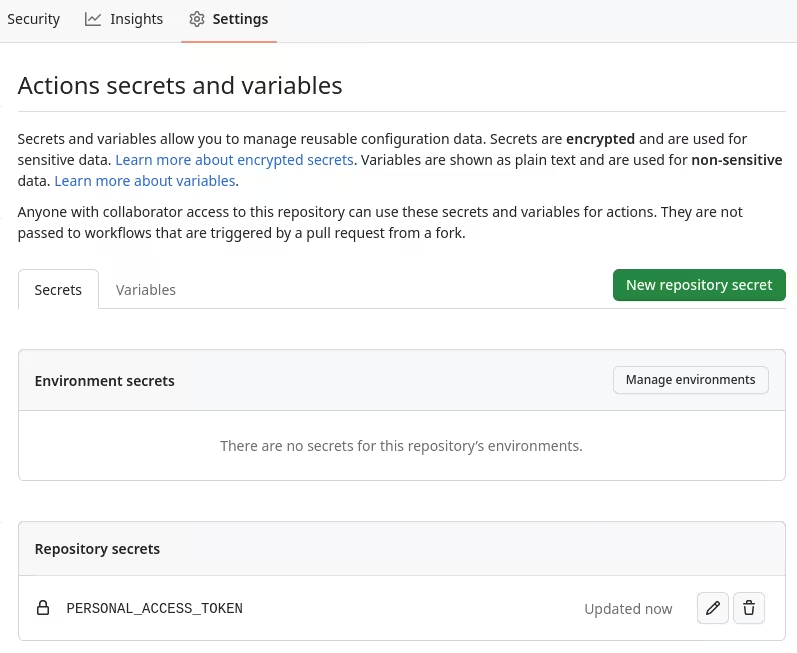
<p>There is an issue reported <a href="https://github.com/stefanzweifel/changelog-updater-action/discussions/30">here</a>
about how to automatically trigger the update changelog workflow from the release workflow. The workaround
to fix it requires adding a new secret (i.e: <code class="language-plaintext highlighter-rouge">PERSONAL_ACCESS_TOKEN</code>) into your repo:</p>

<p style="text-align: center;"><a href="http://blog.jromanmartin.io/images/2023/06/github/gh-secrets.avif"><img src="/images/2023/06/github/gh-secrets.avif" alt="" title="GitHub Repo secrets" /></a></p>

<p><strong>Step 6️⃣ - Release a new version</strong></p>

<p>Now, it is very simple, just follow your development workflow, using your pull-request life cycle, add the labels
of your own repository, and then tag a new version when you are ready to do it.</p>

<p>Push it into your repo:</p>

<div class="language-shell highlighter-rouge"><div class="highlight"><pre class="highlight"><code>git tag v1.2.1 <span class="nt">-m</span> <span class="s2">"Version 1.2.1"</span>
git push origin v1.2.1
</code></pre></div></div>

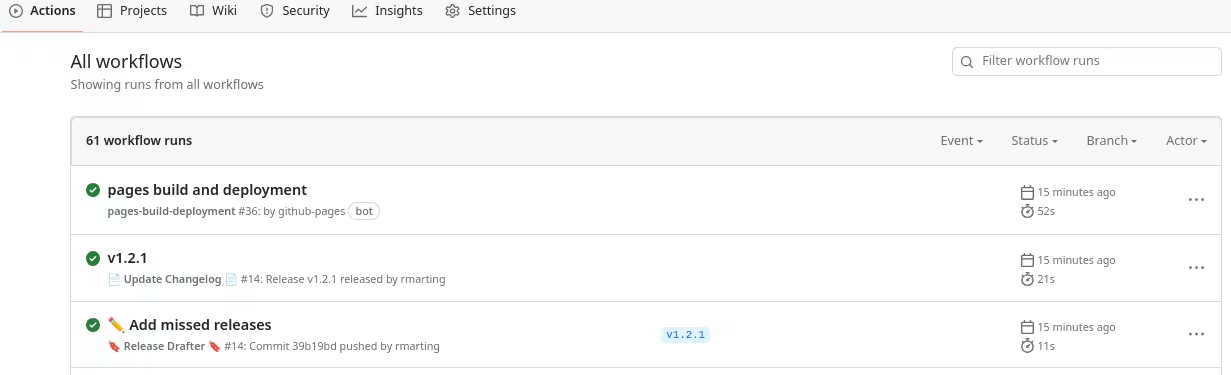
<p>The workflows run as expected:</p>

<p style="text-align: center;"><a href="http://blog.jromanmartin.io/images/2023/06/github/gh-actions.avif"><img src="/images/2023/06/github/gh-actions.avif" alt="" title="Workflows executed" /></a></p>

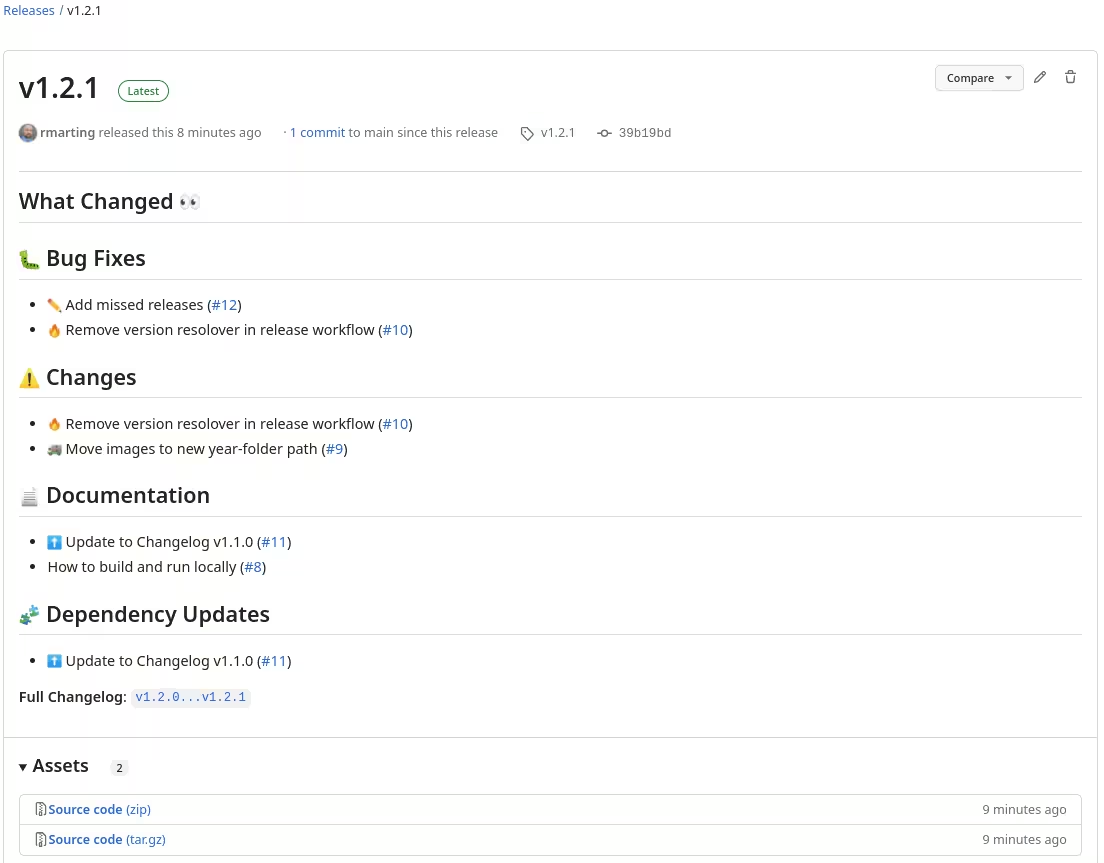
<p>… a new release is created, including the notes:</p>

<p style="text-align: center;"><a href="http://blog.jromanmartin.io/images/2023/06/github/gh-new-release.avif"><img src="/images/2023/06/github/gh-new-release.avif" alt="" title="New GitHub Release" /></a></p>

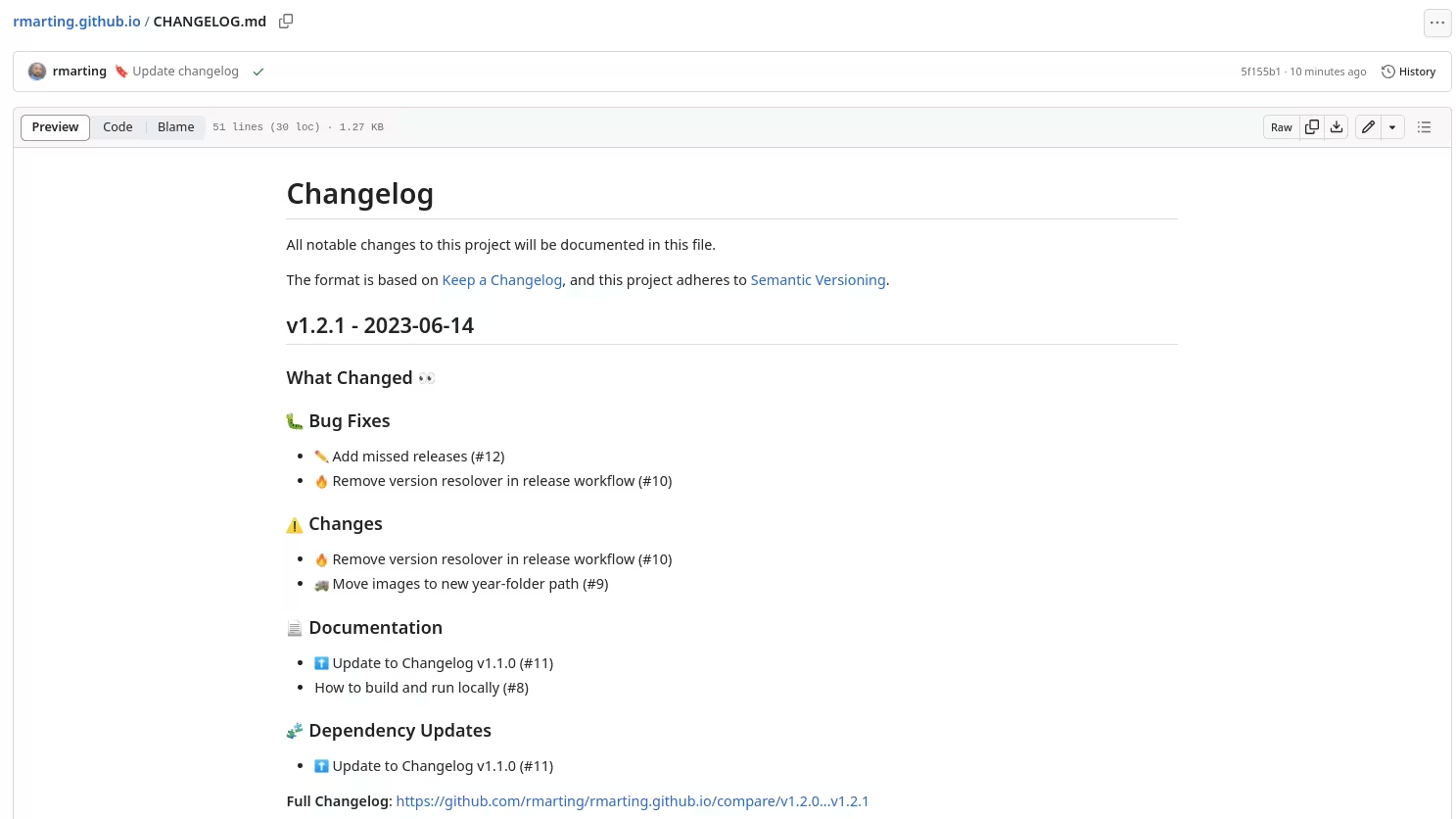
<p>… and the changelog is updated too:</p>

<p style="text-align: center;"><a href="http://blog.jromanmartin.io/images/2023/06/github/gh-changelog.avif"><img src="/images/2023/06/github/gh-changelog.avif" alt="" title="Changelog updated" /></a></p>

<p>This is …</p>

<p style="text-align: center;"><a href="http://blog.jromanmartin.io/images/bitmoji/super-awesome.avif"><img src="/images/bitmoji/super-awesome.avif" alt="" title="Super Awesome" /></a></p>

<p>🤖🚩 Happy automating releasing!!! 🤖🚩</p>

<h2 id="references">References</h2>

<p>This blog post is my own summary about this process, but it was based from the content
and experience of others, such as:</p>

<ul>
  <li><a href="https://tiagomichaelsousa.dev/articles/stop-writing-your-changelogs-manually">Stop writing your changelogs manually</a></li>
  <li><a href="https://github.com/marketplace/actions/release-drafter">Release Drafter GitHub Action</a></li>
  <li><a href="https://github.com/marketplace/actions/changelog-updater">Changelog Update GitHub Action</a></li>
</ul>

<p>My kudos ❤️ to all of them!!!</p>]]></content><author><name>Roman Martin</name></author><category term="Community" /><category term="GitHub" /><category term="git" /><category term="productivity" /><category term="How-to" /><category term="Tutorial" /><category term="development" /><category term="CICD" /><category term="tools" /><summary type="html"><![CDATA[Tutorial to improve a GitHub repo with badges and automatic releasing process.]]></summary></entry><entry><title type="html">📆 2022 in a nutshell!</title><link href="http://blog.jromanmartin.io/2022/12/28/2022-summary.html" rel="alternate" type="text/html" title="📆 2022 in a nutshell!" /><published>2022-12-28T07:00:00+00:00</published><updated>2022-12-28T07:00:00+00:00</updated><id>http://blog.jromanmartin.io/2022/12/28/2022-summary</id><content type="html" xml:base="http://blog.jromanmartin.io/2022/12/28/2022-summary.html"><![CDATA[<p>Another year is ending, and what 🎊 amazing year 🎊. It is time to recap this 2022 reviewing all
the things done, lessons learned, and identifying improvement areas or gaps to cover. I could say
that it is basically my own personal retro in front of my Kanban.</p>

<p>This year was very special for me, as it was the first one working fully in my new team, the amazing
EMEA Cloud-Native Adoption Practice at Red Hat. It means that I was fully immersed in an international environment,
every single day. It was a huge challenge for me collaborating, working, learning, sharing with others from
many different countries, regions, and cultures (and sometimes suffering the different time zones). I joined Red Hat
many years ago (🎂 8 years from now 🎂, the longest time in the same company), but joining this team was another starting point in
my career. I was very nervous 😟, sometimes stressed 😧, and always afraid 😞 about my own Impostor syndrome … but the fact
is that everything went better than I expected and this journey was a BLAST 😁.</p>

<p>I had the chance to work with so many talented, open-minded people, and always willing to support and help me in anything. Their
honest, transparent, and proactive feedback was key for helping me to improve and do my best every single day. So, I can
say thank you to all of them.</p>

<p>Definitely, this is the team, and people where I want to be.</p>

<p>But, what kind of things have I done? I will try to summarize (and anonymize) the most important (for sure I am missing something 😝 …).</p>

<h2 id="-blogging-">📝 Blogging 📝</h2>

<p>I like blogging, and in general writing anything to summarize my findings, engagements, or anything I am working on …
most of my colleagues know me about my documents. This year was not so much productive as I wanted in my personal site, but
this is list of my posts:</p>

<ul>
  <li><a href="https://blog.jromanmartin.io/2022/03/25/monorepo-gitops-cicd-and-beyond.html">Monorepo, GitOps, CICD and beyond</a></li>
  <li><a href="https://blog.jromanmartin.io/2022/04/01/cloud-native-pipelines.html">Cloud Native CICD Pipelines in OpenShift</a></li>
  <li><a href="https://blog.jromanmartin.io/2022/10/28/new-rhoas-cheat-sheet.html">New Red Hat OpenShift Application Services Cheat Sheet</a></li>
</ul>

<p>However, I am very proud of the publication of one of them in the <a href="https://developers.redhat.com/">Red Hat Developer</a>:</p>

<ul>
  <li><a href="https://developers.redhat.com/cheat-sheets/red-hat-amq-broker-cheat-sheet">Red Hat AMQ Broker Cheat Sheet</a></li>
</ul>

<p>I can say that it was the most important publication during this year, and I got great feedback from the readers.</p>

<p>One of the goals of my team is to help our customers and service teams to easily adopt our technology, so I helped to improve
some internal resources. The most important one was providing a new CER template (a.k.a. Consulting Engagement Report) related to
<a href="https://access.redhat.com/documentation/en-us/red_hat_amq/7.2/html-single/getting_started_with_amq_broker/index">Red Hat AMQ Broker</a>.
This template provides the scaffold, common patterns, and structures about Messaging Services based on this product, in cloud
and non-cloud environments. So, it is basically an accelerator of our services in that area.</p>

<h2 id="-customers---technologies---people---devops-and-agile-">🏢 Customers 🏢, 💻 Technologies 💻, 👫 People 👫, 📈 DevOps and Agile 🚤</h2>

<p>This chapter was the most exciting as it basically includes my daily basics in my team. It was a very productive year with
a long list of customers, engagements, technologies, and enablement, where I could help others to achieve great outcomes,
building amazing outputs, and creating high-performance teams.</p>

<p>If I need to summarize the most important ones, here there is the list:</p>

<ul>
  <li>
    <p><strong>Transformation and Acceleration</strong>: Building new teams and implementing new Ways of Working based in a DevOps culture and Agile practices
to transform the teams (and impacting the organizations). Delivering fast solutions, following the Agile principles and values, and shaping
high-performance teams are the most challenging things I was involved with, and the most exciting ones. I love these kinds of engagements. Most
of them were aligned to improve the Software Delivery Life Cycle including new technologies, processes, and skilling people to achieve them.</p>
  </li>
  <li>
    <p><strong>Apache Kafka migrations and architectures</strong>: I was involved with different customers to help them in Apache Kafka migrations in different
scenarios (on-prem to cloud, upgrading versions, …) or designing architectures where this component is key for data streaming solutions,
or microservices architectures. It was a good chance to put in real scenarios something that we wrote some time ago in the
<a href="https://strimzi.io/blog/2021/11/22/migrating-kafka-with-mirror-maker2/">Strimzi Blog</a>.</p>
  </li>
  <li>
    <p><strong>Messaging solutions or services</strong> in cloud environments based in Red Hat AMQ Broker, when Apache Kafka was not an option, using the
OpenShift Operator. It was a good chance to give feedback about the product from our field scenarios and reporting more features, opening
issues, or improving our Knowledge Base with more extra references, such as this <a href="https://access.redhat.com/solutions/6973707">article</a>,
or this <a href="https://access.redhat.com/solutions/6973304">another one</a>. I love our way of collaboration with different Red Hat teams to
improve our products.</p>
  </li>
  <li>
    <p>Workshops about <strong>Event-Driven Architectures</strong> in some customers as a way to design new solutions in cloud environments. These kinds of workshops
helped me to create a sample use case with many different components and demonstrate some of the benefits (and trade-offs). This workshop
is based in this <a href="https://github.com/atarazana/eda-workshop">repository</a>.</p>
  </li>
  <li>
    <p><strong>Advanced microservices architectures or patterns</strong> using Red Hat Service Mesh and Red Hat Serverless. It could be the most technological
challenge this year for one customer. Designing and implementing a solution for accelerating a refactorization of a monolithic application into
a microservices architecture, delegating some cross functional aspects into the features and capabilities provided by both solutions on top
of OpenShift. I learned many things that for sure will help me in other similar scenarios.</p>
  </li>
  <li>
    <p><strong>Collaboration at <a href="https://www.konveyor.io/">Konveyor Community</a></strong> in some of the tools, or repos, to promote and accelerate the modernization
and migration of applications to Kubernetes and Cloud-native technologies. I could help to improve the
<a href="https://konveyor.github.io/tackle-pathfinder-knowledge-base/#/">Tackle Pathfinder Knowledge Base</a>
and collaborate with the amazing team behind the <a href="https://github.com/konveyor/tackle-test-generator-cli">TackleTest</a>, an automated unit and UI
test generation tool to verify your application. I am looking forward to collaborating more next year.</p>
  </li>
  <li>
    <p><strong>Facilitating our amazing <a href="https://www.redhat.com/en/services/training/tl500-devops-culture-and-practice-enablement">DevOps Culture and Practices enablement</a></strong> 
is basically one of my favorite tasks done this year. I had the chance to run in different places (Brussels, Dubai, Frankfurt, London, and Madrid), and
one virtually (but I prefer the on-site version). This enablement represents perfectly our Way of Working and an immersive life experience
about DevOps and Agile in a single week. I could say many things about that, but it is better get them from the public references of some
of the attendees:</p>

    <ul>
      <li><a href="https://www.linkedin.com/posts/marioillan_redhat-activity-6934379540139892736-MnXy?utm_source=share&amp;utm_medium=member_desktop">Mario Illán at LinkedIn</a></li>
      <li><a href="https://www.linkedin.com/posts/arnav-bhati-224b2596_devops-learning-innovation-activity-6966039683248054272-POI4?utm_source=share&amp;utm_medium=member_desktop">Arnav Bhati at LinkedIn</a></li>
      <li><a href="https://www.linkedin.com/posts/eleonora-peruch-29133511b_redhat-devops-softwaredevelopment-activity-6958782469273759744-v1Me?utm_source=share&amp;utm_medium=member_desktop">Eleonora Peruch at LinkedIn</a></li>
      <li><a href="https://www.linkedin.com/feed/update/urn:li:activity:6966394418996072448?updateEntityUrn=urn%3Ali%3Afs_feedUpdate%3A%28V2%2Curn%3Ali%3Aactivity%3A6966394418996072448%29">Amber van Outersterp at LinkedIn</a></li>
      <li><a href="https://www.linkedin.com/feed/update/urn:li:activity:7009637162514010112?updateEntityUrn=urn%3Ali%3Afs_feedUpdate%3A%28V2%2Curn%3Ali%3Aactivity%3A7009637162514010112%29">Sven Kosack at LinkedIn</a></li>
    </ul>
  </li>
  <li>
    <p><strong>A bunch of technologies</strong> … The full list of technologies I touched this year is so long, but mostly I was working with:
<a href="https://www.redhat.com/es/technologies/cloud-computing/openshift/get-started">Red Hat OpenShift</a>,
<a href="https://developers.redhat.com/products/openshift-dev-spaces/overview">Red Hat OpenShift Dev Spaces</a>, <a href="https://tekton.dev/">Tekton</a>,
<a href="https://argo-cd.readthedocs.io/en/stable/">Argo CD</a>, <a href="https://activemq.apache.org/components/artemis/">ActiveMQ Artemis</a>,
<a href="https://access.redhat.com/documentation/en-us/red_hat_amq/2020.q4/html/using_amq_streams_on_openshift/">Red Hat AMQ Streams (Apache Kafka)</a>,
<a href="https://strimzi.io/">Strimzi</a>, <a href="https://www.keycloak.org/">Keycloak</a>, <a href="https://quarkus.io/">Quarkus</a>, <a href="https://camel.apache.org/">Apache Camel</a>,
<a href="https://infinispan.org/">Infinispan</a>, <a href="https://istio.io/latest/about/service-mesh/">Istio and Service Mesh</a>, <a href="https://knative.dev/">Serverless with Knative</a>, …</p>
  </li>
</ul>

<h2 id="-rewards-recognitions-and-achievements-">💫 Rewards, Recognitions and Achievements 💫</h2>

<p>To be rewarded and recognized by your peers is the best way to get positive feedback. Who does not like to be rewarded? This year
was a good one in this area.</p>

<p>I am not looking to get this kind of recognition from others, however, it helps me to identify which kind of actions have more impact
on my colleagues and continue them in the best way, and also to identify areas where I should work to improve them. In any case, it is a metric to
measure how I can help and collaborate with others better.</p>

<p>One of these rewards comes from the Red Hat Giveback Program. This is an incentive program to recognize an associate who goes
above-and-beyond their role-based responsibilities and makes contributions which impact Red Hat. This year I got the following rewards from
this program:</p>

<ul>
  <li><a href="https://www.credly.com/badges/f0d320eb-2a62-42a0-a2dc-8328b04b23d4?source=linked_in_profile">2022 Red Hat Giveback Program Blue Star in April</a></li>
  <li><a href="https://www.credly.com/badges/d10bcfcc-ecd5-4cf0-b937-fe137547ba16/linked_in_profile">2022 Red Hat Giveback Program Gray Star in September</a></li>
</ul>

<p>It was not the only reward from my colleagues, I was awarded as Red Hat Champion for Red Hat OpenShift in the Q2 of 2022, that it was something far
away from any of my expectations or plans. The Red Hat Champions program recognizes those Red Hatters who have proven their product expertise by going above and beyond
to ensure the success of Red Hat products and technologies. It is a peer-nominated program, intended to reward individual Red Hatters that demonstrate Red Hat culture
and values while helping to establish a secure future for Red Hat product growth. So, I was humbled to be proposed and awarded with this recognition by
my colleagues. Thank you so much!!!</p>

<p>More than 1000 points in our Red Hat Reward Zone … another Red Hat’s platform for peer to peer recognition in different competencies to promote the Red Hat’s values
and culture within our colleagues, teams, and customers. My rewards in a nutshell:</p>

<p style="text-align: center;"><a href="http://blog.jromanmartin.io/images/2022/12/year-summary/rewardzone-summary.png"><img src="/images/2022/12/year-summary/rewardzone-summary.png" alt="" title="Reward Zone Summary" /></a></p>

<p>But, the best achievement this year was to beat my personal best in a Half-Marathon race. It was in Madrid and I completed the race
in 1:43:56 … that was 1 minute faster than my previous PB. I am very proud of that achievement, and I am planning to break it again
soon.</p>

<p style="text-align: center;"><a href="http://blog.jromanmartin.io/images/2022/12/year-summary/running-half-marathon-madrid-pb.png"><img src="/images/2022/12/year-summary/running-half-marathon-madrid-pb.png" alt="" title="Half-Marathon PB" /></a></p>

<h2 id="-next-year-">🎯 Next Year 🎯</h2>

<p>I like to have great goals and outcomes to help me to improve myself everyday, but I am not setting them ahead or in stone. I am agile and pivot
as I learn more and when it is appropriate 🚀.</p>

<p>For the next year I am expecting to meet with more colleagues, learn more from all of them, and have fun in anything I will be involved in. My goals will
appear sooner or later, but I don’t mind for now. For sure, my Kanban will have great items to execute.</p>

<p>For my personal life, I have a great milestone to set up a new lifestyle at the end of the Spring, but it is something that someday I will
share broadly with all of you.</p>

<p>Thank you so much to be here, as definitely you are part of the journey of the last year, and a key stakeholder for the next year.</p>

<p>See you in 2023!!! 💻💾💿☕📖🏃💫🏢</p>]]></content><author><name>Roman Martin</name></author><category term="Community" /><category term="GitHub" /><category term="Red Hat" /><category term="productivity" /><summary type="html"><![CDATA[2022 in a nutshell!!!]]></summary></entry><entry><title type="html">:tada: New Red Hat OpenShift Application Services Cheat Sheet!</title><link href="http://blog.jromanmartin.io/2022/10/28/new-rhoas-cheat-sheet.html" rel="alternate" type="text/html" title=":tada: New Red Hat OpenShift Application Services Cheat Sheet!" /><published>2022-10-28T07:00:00+00:00</published><updated>2022-10-28T07:00:00+00:00</updated><id>http://blog.jromanmartin.io/2022/10/28/new-rhoas-cheat-sheet</id><content type="html" xml:base="http://blog.jromanmartin.io/2022/10/28/new-rhoas-cheat-sheet.html"><![CDATA[<p>I was playing, testing, and learning for a while the
<a href="https://www.redhat.com/en/technologies/cloud-computing/openshift/cloud-services">Red Hat Cloud Services</a>.
These services include a managed platform and data services to reduce the operational cost and
complexity of delivering cloud-native applications. And also facilitates the life of the developers 😄.</p>

<p>Some of these services are:</p>

<ul>
  <li><a href="https://developers.redhat.com/products/red-hat-openshift-streams-for-apache-kafka/overview">OpenShift Streams for Apache Kafka</a>
provides a managed service of Apache Kafka. You don’t need to deal with the complexity of the infrastructure of an Apache Kafka cluster.</li>
  <li><a href="https://developers.redhat.com/articles/2021/10/04/get-started-openshift-service-registry">OpenShift Service Registry</a>
provides a full managed service of an API and schema registry, key for any event-driven architecture.</li>
</ul>

<p>So I decided to refactor my loved 😍 <a href="https://github.com/rmarting/kafka-clients-quarkus-sample">Kafka Clients Quarkus Edition</a>
repository to use these streaming services, running everything in my <a href="https://developers.redhat.com/developer-sandbox">Developer Sandbox</a>
as Red Hat Developer.</p>

<p>The results of this learning path is this new
<a href="https://github.com/rmarting/quarkus-streaming-managed-services-sample">Kafka Clients Quarkus Edition with Managed Services</a>
repository using the latest versions of the components (e.g: <a href="https://quarkus.io/">Quarkus</a>, <a href="https://www.eclipse.org/jkube/">JKube</a>)
integrated easily, running locally or remotely successfully.</p>

<p>Red Hat OpenShift Cloud Services provides a powerful command line interface (CLI) called <code class="language-plaintext highlighter-rouge">rhoas</code>. This
CLI is very well documented in its <a href="https://appservices.tech/">website</a>, however, I decided to create
my own Cheat Sheet to know all the commands and for my own references. So,</p>

<p>:tada: I am pleasure to announce that a new Cheat Sheet is available: :tada:</p>

<ul>
  <li>:bookmark: <a href="/cheat-sheets/rhoas">Red Hat OpenShift Application Services</a></li>
</ul>

<p>I hope this new cheat sheet helps you when you need to manage your own Managed Services provided by
Red Hat.</p>

<p>My full list of Cheat Sheets are available for your records <a href="/cheat-sheets">here</a>. As usual,
comments, ideas, PRs are welcomed!</p>

<p>Happy coding !!! 💻💾💿☕</p>]]></content><author><name>Roman Martin</name></author><category term="How-to" /><category term="Cheat Sheet" /><category term="Red Hat OpenShift" /><category term="Application Services" /><category term="tutorial" /><summary type="html"><![CDATA[New Red Hat OpenShift Application Services Cheat Sheet available for you.]]></summary></entry><entry><title type="html">:tada: ActiveMQ Artemis Cheat Sheet in Red Hat Developers</title><link href="http://blog.jromanmartin.io/2022/09/03/amq-broker-cheatsheet-in-rhd.html" rel="alternate" type="text/html" title=":tada: ActiveMQ Artemis Cheat Sheet in Red Hat Developers" /><published>2022-09-03T18:00:00+00:00</published><updated>2022-09-03T18:00:00+00:00</updated><id>http://blog.jromanmartin.io/2022/09/03/amq-broker-cheatsheet-in-rhd</id><content type="html" xml:base="http://blog.jromanmartin.io/2022/09/03/amq-broker-cheatsheet-in-rhd.html"><![CDATA[<p>🎊 Wow! 🎊 My small ActiveMQ Artemis Cheat Sheet was promoted as an official
<a href="https://developers.redhat.com/cheat-sheets">Red Hat Developer Cheat Sheet</a> 🔝.
Now you can find it now as Red Hat AMQ Broker Cheat Sheet.</p>

<p>Since I posted my original 📝 <a href="https://blog.jromanmartin.io/cheat-sheets/activemq-artemis">ActiveMQ Artemis cheat sheet</a>,
I got great feedback 👆, comments 💬, and improvements 🙋 about it from many colleagues, and others ones,
interested in this amazing messaging project. Google Analytics 📈 identified it as the most visited
content of this small space on the Internet 🌐. I am very proud of it 😊.</p>

<p>Now, this content is now hosted as another Cheat Sheet on the Red Hat Developers site. Something
that I could not expect when I posted for the first time. It was only possible thanks to
great colleagues such as Hugo Guerrero, and the fantastic Red Hat Developer team. Thank you so much!</p>

<p>Now, I hope you can find it useful to introduce you to this amazing messaging product.</p>

<p>Enjoy it! :sailboat:</p>]]></content><author><name>Roman Martin</name></author><category term="Blogs" /><category term="Community" /><category term="Red Hat" /><summary type="html"><![CDATA[A new cheat sheet available in Red Hat Developers. Sharing is caring!!!]]></summary></entry><entry><title type="html">:rocket: Cloud Native CICD Pipelines in OpenShift</title><link href="http://blog.jromanmartin.io/2022/04/01/cloud-native-pipelines.html" rel="alternate" type="text/html" title=":rocket: Cloud Native CICD Pipelines in OpenShift" /><published>2022-04-01T00:00:00+00:00</published><updated>2022-04-01T00:00:00+00:00</updated><id>http://blog.jromanmartin.io/2022/04/01/cloud-native-pipelines</id><content type="html" xml:base="http://blog.jromanmartin.io/2022/04/01/cloud-native-pipelines.html"><![CDATA[<h2 id="cloud-native-cicd-pipelines-in-openshift">Cloud Native CICD Pipelines in OpenShift</h2>

<p>My first <a href="https://openpracticelibrary.com/practice/continuous-integration/">Continuous Integration</a> and
<a href="https://openpracticelibrary.com/practice/continuous-delivery/">Continuous Delivery</a> pipelines (from now CICD)
were created with <a href="https://en.wikipedia.org/wiki/Hudson_(software)">Hudson</a>
(I know, I know !! I am very old :older_man: on this space), and after that with <a href="https://www.jenkins.io/">Jenkins</a>
for longer time. During this long period I used it (and others similar) to build, test, package,
and deploy many different kind of applications (Monolith, SOA Services, Microservices, standalone apps, …) into
many different kind of platforms (<a href="https://tomcat.apache.org/">Tomcat</a>, 
<a href="https://www.redhat.com/en/technologies/jboss-middleware/application-platform">Red Hat JBoss Enterprise Applications</a>,
<a href="https://www.oracle.com/es/java/weblogic/">WebLogic</a>, …)
and of course on containers platform such as <a href="https://www.redhat.com/en/technologies/cloud-computing/openshift">Red Hat OpenShift</a>.</p>

<p>However, in cloud environments with cloud native applications in some cases I found so much complexity not easy to deal
with it. Basically these tools were defined to run on Virtual Machines, required IT operations for maintenance,
conflicts between teams or projects with shared plugins or extensions, no native interoperability with Kubernetes resources, …</p>

<p>… and nowadays I found a new player in this scenario to improve my CICD pipelines in the new Cloud Native World,
with containers, Kubernetes, and OpenShift. This player is <a href="https://tekton.dev/">Tekton</a>, or
<a href="https://cloud.redhat.com/learn/topics/ci-cd">Red Hat OpenShift Pipelines</a> as the enterprise version for OpenShift.</p>

<p>Tekton is a cloud-native solution for building CICD systems, providing a set of building blocks, components and an
extended catalog (<a href="https://hub.tekton.dev/">Tekton Hub</a>) with great resources to use, making it a complete
ecosystem. It is part of the <a href="https://cd.foundation/">CD Foundation</a> with a great community, very active.</p>

<p>As Tekton is installed as a <a href="https://kubernetes.io/docs/concepts/extend-kubernetes/operator/">Kubernetes Operator</a>,
providing <a href="https://kubernetes.io/docs/concepts/extend-kubernetes/api-extension/custom-resources/">Custom Resources Definitions</a>
to define the building blocks, it is very easy to create, and reuse them in the pipelines. As other Kubernetes or
OpenShift objects, Tekton CRDs are first-citizens, so many of the processes uses to manage your OpenShift platform
are valid for them. For example, as a fan of <a href="https://openpracticelibrary.com/practice/everything-as-code/">Everything as Code</a>
practice, I can define my CICD pipelines as code and store them in a Git repository.</p>

<p>Tekton uses the services provides by the OpenShift, so it is designed for containers, and scalability. It means that
the pipelines and tasks are executed on-demand with containers, so it is easy to scale them. We, as CICD designers, 
don’t need to deal with the platform, or infrastructure, as OpenShift provides us the services, and Tekton the objects
to design the flow of our CICD pipeline.</p>

<p>In that integration with OpenShift services, the building images processes are now really native and we could use
any of the technologies available, such as <a href="https://github.com/openshift/source-to-image">source-to-image</a>,
<a href="https://buildah.io/">buildah</a>, <a href="https://github.com/GoogleContainerTools/kaniko">kaniko</a>,
<a href="https://github.com/GoogleContainerTools/jib">jib</a>, … Not more needed creating a custom image for a Jenkins-agent
to build our application.</p>

<p>The same to integrate the deployment processes of your application, as you can interact natively with the platform
… but in this scenario I am more fan to move the Continuous Delivery following
the <a href="https://openpracticelibrary.com/practice/gitops/">GitOps</a> approach with another amazing tool
as <a href="https://github.com/argoproj/argo-cd">ArgoCD</a> (but that is another story, and other blog-post :wink:).</p>

<p>At last, but not least, Tekton provides a set of amazing tooling to use on your favorite IDE, command-line tool
and so on, and accelerate the adoption by your side, and make your life easier:</p>

<ul>
  <li><a href="https://tekton.dev/docs/cli/"><code class="language-plaintext highlighter-rouge">tkn</code> command line interface</a></li>
  <li><a href="https://github.com/redhat-developer/vscode-tekton">Tekton Pipelines Extension for VSCode</a></li>
  <li><a href="https://plugins.jetbrains.com/plugin/14096-tekton-pipelines-by-red-hat">Tekton Pipelines by Red Hat for IntelliJ</a></li>
</ul>

<p>So, let’s go through across the main components of this amazing project.</p>

<h2 id="tekton-components">Tekton Components</h2>

<p>Tekton provides a set of different components to design and build your pipelines:</p>

<ul>
  <li>Tasks</li>
  <li>Pipelines</li>
  <li>Workspaces</li>
  <li>Triggers</li>
</ul>

<p>There are others too, but these ones are the base.</p>

<h3 id="tasks">Tasks</h3>

<p><a href="https://tekton.dev/docs/pipelines/tasks/"><code class="language-plaintext highlighter-rouge">Tasks</code></a> is a collection of <code class="language-plaintext highlighter-rouge">Steps</code> that
you define and arrange in a specific order of execution as part of your continuous
integration flow.</p>

<p><code class="language-plaintext highlighter-rouge">Tasks</code> can have more than one <code class="language-plaintext highlighter-rouge">step</code>, allowing to specialize the task with more
detailed steps. The steps will run in the order in which they are defined in the
steps array.</p>

<p>A <code class="language-plaintext highlighter-rouge">Task</code> is available within a specific namespace, while a <code class="language-plaintext highlighter-rouge">ClusterTask</code> is
available across the entire cluster.</p>

<p>A <code class="language-plaintext highlighter-rouge">Task</code> is executed as a Pod on your OpenShift cluster.</p>

<p>This is the typical <code class="language-plaintext highlighter-rouge">Hello World</code> Task.</p>

<div class="language-yaml highlighter-rouge"><div class="highlight"><pre class="highlight"><code><span class="na">apiVersion</span><span class="pi">:</span> <span class="s">tekton.dev/v1beta1</span>
<span class="na">kind</span><span class="pi">:</span> <span class="s">Task</span>
<span class="na">metadata</span><span class="pi">:</span>
  <span class="na">name</span><span class="pi">:</span> <span class="s">hello-task</span>
<span class="na">spec</span><span class="pi">:</span>
  <span class="na">steps</span><span class="pi">:</span>
    <span class="pi">-</span> <span class="na">name</span><span class="pi">:</span> <span class="s">say-hello</span>
      <span class="na">image</span><span class="pi">:</span> <span class="s">registry.redhat.io/ubi7/ubi-minimal</span>
      <span class="na">command</span><span class="pi">:</span> <span class="pi">[</span><span class="s1">'</span><span class="s">/bin/bash'</span><span class="pi">]</span>
      <span class="na">args</span><span class="pi">:</span> <span class="pi">[</span><span class="s1">'</span><span class="s">-c'</span><span class="pi">,</span> <span class="s1">'</span><span class="s">echo</span><span class="nv"> </span><span class="s">Hello</span><span class="nv"> </span><span class="s">World'</span><span class="pi">]</span>
</code></pre></div></div>

<p>Meanwhile a <code class="language-plaintext highlighter-rouge">Task</code> is a definition, the execution of the task with the results
and outputs is a <code class="language-plaintext highlighter-rouge">TaskRun</code>.</p>

<p>An execution of previous task should be similar to (<em>simplified and omitted some fields</em>):</p>

<div class="language-yaml highlighter-rouge"><div class="highlight"><pre class="highlight"><code><span class="na">apiVersion</span><span class="pi">:</span> <span class="s">tekton.dev/v1beta1</span>
<span class="na">kind</span><span class="pi">:</span> <span class="s">TaskRun</span>
<span class="na">metadata</span><span class="pi">:</span>
  <span class="na">generateName</span><span class="pi">:</span> <span class="s">hello-task-run-</span>
  <span class="na">name</span><span class="pi">:</span> <span class="s">hello-task-run-9d8hs</span>
  <span class="na">uid</span><span class="pi">:</span> <span class="s">f3c8d81b-3e8d-4ad5-a01b-bf9b147485f6</span>
  <span class="na">creationTimestamp</span><span class="pi">:</span> <span class="s1">'</span><span class="s">2022-03-31T16:34:41Z'</span>
  <span class="na">namespace</span><span class="pi">:</span> <span class="s">pipelines-demo</span>
  <span class="na">labels</span><span class="pi">:</span>
    <span class="na">app.kubernetes.io/managed-by</span><span class="pi">:</span> <span class="s">tekton-pipelines</span>
    <span class="na">tekton.dev/task</span><span class="pi">:</span> <span class="s">hello-task</span>
<span class="na">spec</span><span class="pi">:</span>
  <span class="na">taskRef</span><span class="pi">:</span>
    <span class="na">kind</span><span class="pi">:</span> <span class="s">Task</span>
    <span class="na">name</span><span class="pi">:</span> <span class="s">hello-task</span>
<span class="na">status</span><span class="pi">:</span>
  <span class="na">completionTime</span><span class="pi">:</span> <span class="s1">'</span><span class="s">2022-03-31T16:34:47Z'</span>
  <span class="na">conditions</span><span class="pi">:</span>
    <span class="pi">-</span> <span class="na">lastTransitionTime</span><span class="pi">:</span> <span class="s1">'</span><span class="s">2022-03-31T16:34:47Z'</span>
      <span class="na">message</span><span class="pi">:</span> <span class="s">All Steps have completed executing</span>
      <span class="na">reason</span><span class="pi">:</span> <span class="s">Succeeded</span>
      <span class="na">status</span><span class="pi">:</span> <span class="s1">'</span><span class="s">True'</span>
      <span class="na">type</span><span class="pi">:</span> <span class="s">Succeeded</span>
  <span class="na">podName</span><span class="pi">:</span> <span class="s">hello-task-run-9d8hs-pod-kqcjv</span>
  <span class="na">startTime</span><span class="pi">:</span> <span class="s1">'</span><span class="s">2022-03-31T16:34:41Z'</span>
  <span class="na">steps</span><span class="pi">:</span>
    <span class="pi">-</span> <span class="na">container</span><span class="pi">:</span> <span class="s">step-say-hello</span>
      <span class="na">imageID</span><span class="pi">:</span> <span class="pi">&gt;-</span>
        <span class="s">registry.redhat.io/ubi7/ubi-minimal@sha256:700ec6f27ae8380ca1a3fcab19b5630d5af397c980628fa1a207bf9704d88eb0</span>
      <span class="na">name</span><span class="pi">:</span> <span class="s">say-hello</span>
      <span class="na">terminated</span><span class="pi">:</span>
        <span class="na">containerID</span><span class="pi">:</span> <span class="s">cri-o://346b671912a63a98b310f0f06f0bcd9d9e3fab3b24a75246aed4921863b1d146</span>
        <span class="na">exitCode</span><span class="pi">:</span> <span class="m">0</span>
        <span class="na">finishedAt</span><span class="pi">:</span> <span class="s1">'</span><span class="s">2022-03-31T16:34:46Z'</span>
        <span class="na">reason</span><span class="pi">:</span> <span class="s">Completed</span>
        <span class="na">startedAt</span><span class="pi">:</span> <span class="s1">'</span><span class="s">2022-03-31T16:34:46Z'</span>
</code></pre></div></div>

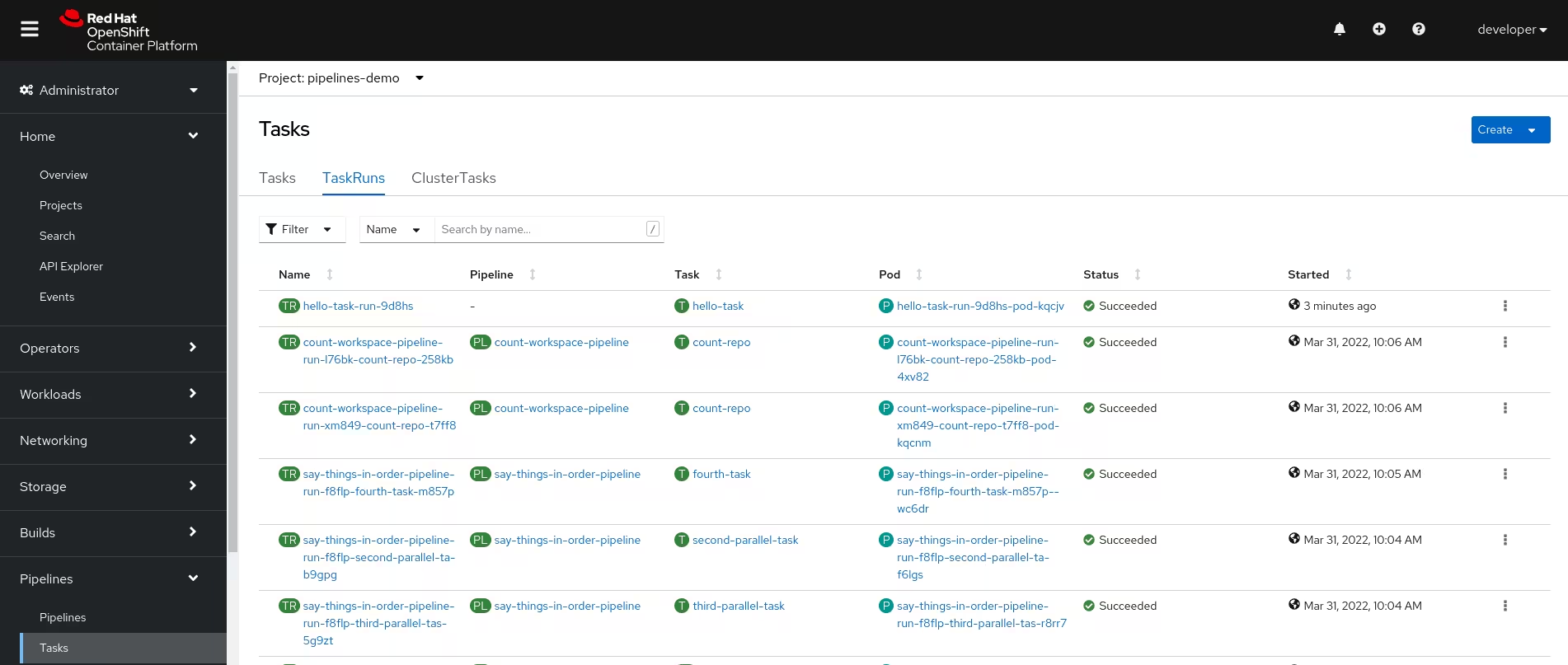
<p>OpenShift provides a great dashboard to browse and inspect the Tasks and TasksRun</p>

<p style="text-align: center;"><a href="http://blog.jromanmartin.io/images/ocp-pipelines/ocp-tasks-dashboard.avif"><img src="/images/ocp-pipelines/ocp-tasks-dashboard.avif" alt="" title="OpenShift Tasks Dashboard" /></a></p>

<h3 id="pipelines">Pipelines</h3>

<p><a href="https://tekton.dev/docs/pipelines/pipelines/"><code class="language-plaintext highlighter-rouge">Pipelines</code></a> are a collection of <code class="language-plaintext highlighter-rouge">Tasks</code> that
you define and arrange in a specific order of execution as part of your continuous
integration flow. In fact, tasks should do one single thing so you can reuse them across
pipelines or even within a single pipeline.</p>

<p>You can configure various execution conditions to fit your business needs.</p>

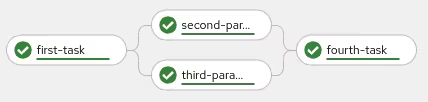
<p>This <a href="https://github.com/rmarting/ocp-pipelines-demo/blob/main/05-say-things-in-order-pipeline.yaml">example</a> could
give you a general view of a pipeline. This pipeline should be represented as:</p>

<p style="text-align: center;"><a href="http://blog.jromanmartin.io/images/ocp-pipelines/ocp-pipeline-flow.avif"><img src="/images/ocp-pipelines/ocp-pipeline-flow.avif" alt="" title="Pipeline Flow" /></a></p>

<p>Each <code class="language-plaintext highlighter-rouge">Task</code> in a <code class="language-plaintext highlighter-rouge">Pipeline</code> executes as a <code class="language-plaintext highlighter-rouge">Pod</code> on your OpenShift cluster.</p>

<p>Meanwhile a <code class="language-plaintext highlighter-rouge">Pipeline</code> is a definition, the execution of the pipeline with the results
and outputs is a <code class="language-plaintext highlighter-rouge">PipelineRun</code>.</p>

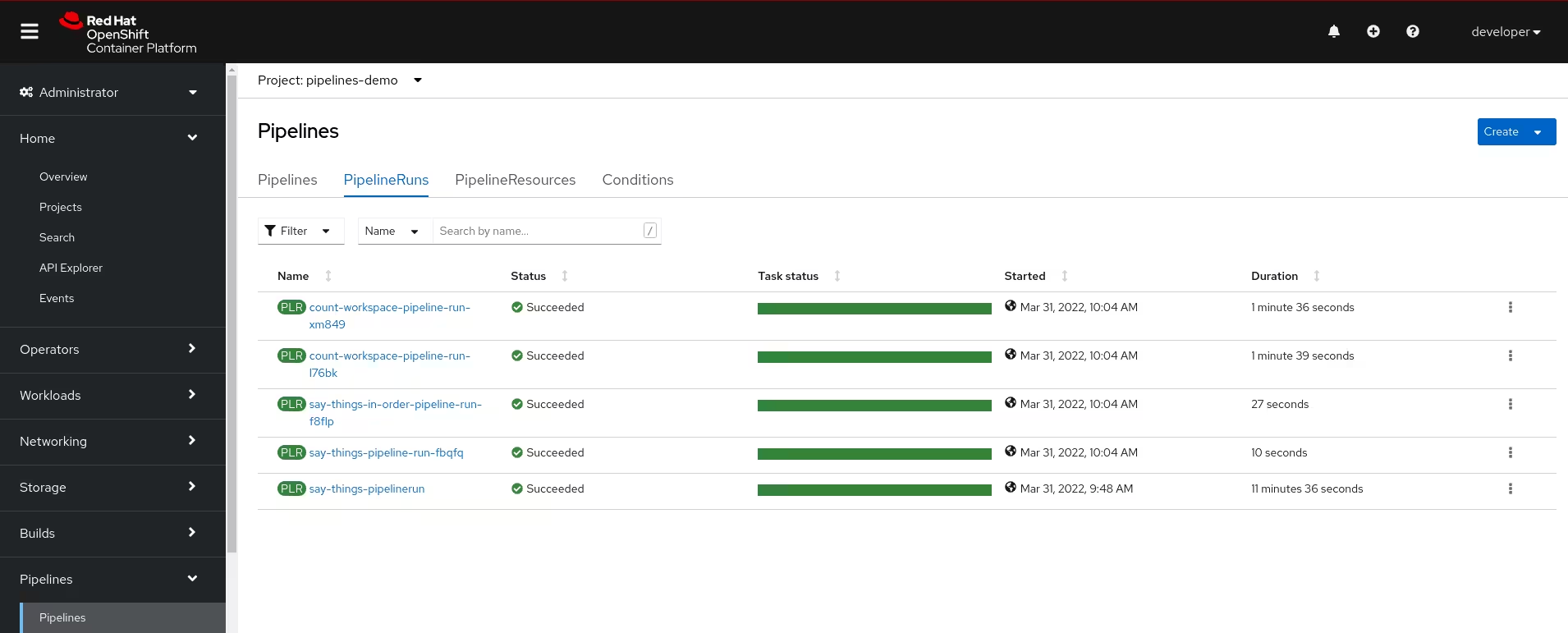
<p>OpenShift provides a great dashboard to browse and inspect the Tasks and TasksRun</p>

<p style="text-align: center;"><a href="http://blog.jromanmartin.io/images/ocp-pipelines/ocp-pipelines-dashboard.avif"><img src="/images/ocp-pipelines/ocp-pipelines-dashboard.avif" alt="" title="OpenShift Pipelines Dashboard" /></a></p>

<h3 id="workspaces">Workspaces</h3>

<p><a href="https://tekton.dev/docs/pipelines/workspaces/"><code class="language-plaintext highlighter-rouge">Workspaces</code></a> allow <code class="language-plaintext highlighter-rouge">Tasks</code> to declare parts
of the filesystem that need to be provided at runtime by <code class="language-plaintext highlighter-rouge">TaskRuns</code>. The main use cases are:</p>

<ul>
  <li>Storage of inputs and/or outputs</li>
  <li>Sharing data among <code class="language-plaintext highlighter-rouge">Tasks</code></li>
  <li>Mount points for configurations held in <code class="language-plaintext highlighter-rouge">Secrets</code> or <code class="language-plaintext highlighter-rouge">ConfigMaps</code></li>
  <li>A cache of build artifacts that speed up jobs</li>
</ul>

<p><code class="language-plaintext highlighter-rouge">Workspaces</code> are similar to <code class="language-plaintext highlighter-rouge">Volumes</code> except that they allow a <code class="language-plaintext highlighter-rouge">Task</code> author to defer to
users and their <code class="language-plaintext highlighter-rouge">TaskRuns</code> when deciding which class of storage to use.</p>

<h3 id="triggers">Triggers</h3>

<p><a href="https://tekton.dev/docs/triggers/"><code class="language-plaintext highlighter-rouge">Triggers</code></a> are the components ready to detect and extract
information from events from a variety of sources and execute <code class="language-plaintext highlighter-rouge">Tasks</code> or <code class="language-plaintext highlighter-rouge">Pipelines</code> to respond
them.</p>

<p>Triggers are a set of different objects:</p>

<ul>
  <li><code class="language-plaintext highlighter-rouge">EventListener</code>: listens for events at a specified port on your OpenShift cluster. Specifies
one or more <code class="language-plaintext highlighter-rouge">Triggers</code> or <code class="language-plaintext highlighter-rouge">TriggerTemplates</code>.</li>
  <li><code class="language-plaintext highlighter-rouge">Trigger</code>: specifies what happens when the <code class="language-plaintext highlighter-rouge">EventListener</code> detects an event. It is defined
with a <code class="language-plaintext highlighter-rouge">TriggerTemplate</code>, a <code class="language-plaintext highlighter-rouge">TriggerBinding</code>, and optionally, an <a href="https://tekton.dev/docs/triggers/interceptors/">Interceptor</a>.</li>
  <li><code class="language-plaintext highlighter-rouge">TriggerTemplate</code>: specifies a blueprint for the resource, such as a <code class="language-plaintext highlighter-rouge">TaskRun</code> or <code class="language-plaintext highlighter-rouge">PipelineRun</code>, that
you want to instantiate and/or execute when your <code class="language-plaintext highlighter-rouge">EventListener</code> detects an event.</li>
  <li><code class="language-plaintext highlighter-rouge">TriggerBinding</code>: specifies the fields in the event payload from which you want to extract
data and the fields in your corresponding <code class="language-plaintext highlighter-rouge">TriggerTemplate</code> to populate with the extracted
values. You can then use the populated fields in the <code class="language-plaintext highlighter-rouge">TriggerTemplate</code> to populate fields in
the associated <code class="language-plaintext highlighter-rouge">TaskRun</code> or <code class="language-plaintext highlighter-rouge">PipelineRun</code>.</li>
</ul>

<p>The most common use case of the <code class="language-plaintext highlighter-rouge">Triggers</code> and <code class="language-plaintext highlighter-rouge">EventListeners</code> is integrated with Git repositories
through the use of WebHooks. A Git mechanism to get data from any change in a Git repository.</p>

<h2 id="show-me-the-code">Show me the code</h2>

<p>But, you could do more things with OpenShift Pipelines, to design you cloud native pipelines. This is a
small briefing of the main characteristics and features. But if you want to play with this new toy, I created
a sample <a href="https://github.com/rmarting/ocp-pipelines-demo">GitHub repository</a> with a demo of tasks, pipelines and triggers.</p>

<p><a href="https://github.com/rmarting/ocp-pipelines-demo">https://github.com/rmarting/ocp-pipelines-demo</a></p>

<p>From here, only your imagination, use cases and Tekton could help you to create amazing pipelines in
a easy, descriptive and simple way.</p>

<p>And if you want to dive deeper, don’t miss to check the following references:</p>

<ul>
  <li><a href="https://tekton.dev/docs/">Tekton Documentation</a></li>
  <li><a href="https://pipelinesascode.com/">Pipelines as Code</a>, an opinionated CI based on OpenShift Pipelines / Tekton.</li>
  <li><a href="https://github.com/tektoncd/chains">Tekton Chains</a> for supply chain security.</li>
</ul>

<p>Happy cloud-native pipelining :smiley:!!!</p>]]></content><author><name>Roman Martin</name></author><category term="Tutorial" /><category term="OpenShift" /><category term="Operators" /><category term="Tekton" /><category term="CICD" /><category term="Cloud Native" /><category term="development" /><category term="productivity" /><summary type="html"><![CDATA[Overview of cloud native CICD pipelines provided by Tekton running on top of OpenShift.]]></summary></entry><entry><title type="html">:rocket: Monorepo, GitOps, CICD and beyond</title><link href="http://blog.jromanmartin.io/2022/03/25/monorepo-gitops-cicd-and-beyond.html" rel="alternate" type="text/html" title=":rocket: Monorepo, GitOps, CICD and beyond" /><published>2022-03-25T10:00:00+00:00</published><updated>2022-03-25T10:00:00+00:00</updated><id>http://blog.jromanmartin.io/2022/03/25/monorepo-gitops-cicd-and-beyond</id><content type="html" xml:base="http://blog.jromanmartin.io/2022/03/25/monorepo-gitops-cicd-and-beyond.html"><![CDATA[<h1 id="gitops-product-monorepo-sample">GitOps Product Monorepo Sample</h1>

<p>Developing cloud native products following Agile, and DevOps practices could require
to use different approaches, patterns and processes to do it in a fast pace. Many of the
most common patterns in this space are:</p>

<ul>
  <li>Product Monorepo</li>
  <li>Trunk-based development</li>
  <li>GitOps</li>
  <li>Cloud Native Application</li>
  <li>Continuous Integration, Continuous Delivery and Continuous Deployment</li>
  <li>Sealed Secrets</li>
</ul>

<p>Use all of them at the same time could be a challenge for a new team, but it is possible
getting the best benefits from each of them. I have working in many different use cases and products
for a long time, many times using these patterns in somehow, learning from the pitfalls, and
getting the best benefits. This repo represents an <em>opinionated</em> manner to 
do it for a new product team, combining all these practices in the same place.</p>

<p>Hoping this approach could help in your use case. Use carefully all the assess, and land into
your specif use case.</p>

<p>The <code class="language-plaintext highlighter-rouge">product</code> is the software solution created for a business scenario, adding the value and solution
to achieve the goals of the business. We build software to resolve business scenarios.</p>

<p>❗ Soon a blog post will try to clarify many of the aspects related with this repo. Stay tunned!❗</p>

<h2 id="product-monorepo">Product Monorepo</h2>

<p>Product <a href="https://en.wikipedia.org/wiki/Monorepo">Monorepo</a> means to have everything related with a software product
in one single place, shared with the product team, to implement the full Software Delivery Life cycle of the product.</p>

<p>One of the most important topics for a Product Monorepo is to have a clear folder structure, otherwise
you could get a chaotic layout with more pains that gains.</p>

<p>This repo is organized as:</p>

<ul>
  <li><a href="./bootstrap/README.md">bootstrap</a> folder includes the initial components to setup the environment, mainly
tools to define the base of the rest of the solution.</li>
  <li><a href="./apps/">apps</a> folder includes the list of applications or components of the product.</li>
  <li><a href="./charts/README.md">charts</a> folder includes the Helm Charts to accelerate the deployment of any component,
tool or application related with the product.</li>
  <li><a href="./argocd/README.md">argocd</a> folder includes the items related with ArgoCD and GitOps.</li>
  <li><a href="./tekton/README.md">tekton</a> folder includes the items related with Tekton and Pipelines.</li>
  <li><a href="./e2e-test/README.md">e2e-test</a> folder includes the end-to-end test suites of the product.</li>
</ul>

<h2 id="trunk-based-development">Trunk-based Development</h2>

<p>A Monorepo is a specific <a href="https://trunkbaseddevelopment.com/">Trunk-Based Development</a> implementation where
the product team puts its source for all applications/services/libraries/frameworks into one repository and
forces team members to commit together in that trunk - atomically.</p>

<p>The <code class="language-plaintext highlighter-rouge">trunk</code> branch is defined basically as productive and any change merged there is candidate to be deployed
in any environment, including production. There are not any other starting point to promote changes, as everything
is integrated in the trunk. Other branches are considered ephemeral, to manage short pieces of changes, with
a review process (by <a href="https://openpracticelibrary.com/practice/pair-programming/">pair programming</a> or by a
Pull Request) before to be merged into the trunk.</p>

<p>This method allows the team members to develop fast small chunks (many times as <a href="https://openpracticelibrary.com/practice/feature-toggles/">features flags</a>
or not), with sooner integrations cycles, reducing merge conflicts, and promoting changes to others faster.</p>

<h2 id="gitops">GitOps</h2>

<p><a href="https://openpracticelibrary.com/practice/gitops/">GitOps</a> defines the source of truth a Git repository,
where everything starts from there and defining the desired state of our product.</p>

<h2 id="cloud-native-application">Cloud Native Application</h2>

<p>Designing our product as a <a href="https://en.wikipedia.org/wiki/Cloud_native_computing">Cloud Native</a> solution will bring us
many benefits in cloud environments. Most of the cases a Microservice architecture following the <a href="https://12factor.net/">Twelve-Factor App</a>
methodology is the right starting point. Our product will implement that methodology.</p>

<h2 id="continuous-integration-continuous-delivery-and-continuous-deployment">Continuous Integration, Continuous Delivery and Continuous Deployment</h2>

<p>Any product in the new automated era must be done without the most well-known benefits of
<a href="https://openpracticelibrary.com/practice/continuous-integration/">Continuous Integration</a>,
<a href="https://openpracticelibrary.com/practice/continuous-delivery/">Continuous Delivery</a> and
<a href="https://openpracticelibrary.com/practice/continuous-deployment/">Continuous Deployment</a>. Otherwise
you are failing from the beginning.</p>

<h2 id="sealed-secrets">Sealed Secrets</h2>

<p>GitOps means <strong>“if it’s not in Git, it’s NOT REAL”</strong>, so it is a challenge to store sensitive data, like credentials,
in Git repositories, where many people can access?. OpenShift provides a good way to manage sensitive data in the platform, but
we need to extend it with other great tools to store sensitive data in Git without any break of security.</p>

<p>Here <a href="https://github.com/bitnami-labs/sealed-secrets">Sealed Secrets</a> arrives to help us.</p>

<h2 id="playing-with-our-product-monorepo">Playing with our Product Monorepo</h2>

<p>Now, it is time to play :game_die:.</p>

<p>This repository defines a sample product with the following applications:</p>

<ul>
  <li>A sample Angular application as frontend for the final users. Details <a href="./apps/sample-frontend/README.md">here</a></li>
  <li>A sample Quarkus application as backend to manage the <em>business logic</em> of our product. Details <a href="./apps/sample-backend/README.md">here</a></li>
</ul>

<p><img src="./img/product-deployment-topology.png" alt="Product Monorepo Topology" /></p>

<h3 id="requirements">Requirements</h3>

<p>This repository had been developed and tested in the following environment:</p>

<ul>
  <li>Red Hat OpenShift Container Platform 4.10</li>
  <li>Red Hat OpenShift GitOps 1.4.3 (ArgoCD)</li>
  <li>Red Hat OpenShift Pipelines 1.6.2 (Tekton)</li>
  <li>Sealed Secrets Helm Chart 1.16.1</li>
</ul>

<h3 id="bootstrapping-red-hat-openshift-container-platform">Bootstrapping Red Hat OpenShift Container Platform</h3>

<p>To prepare your OCP environment, review and follow the <a href="./bootstrap/README.md">bootstrap instructions</a></p>

<p>If everything goes fine, your environment should look like as:</p>

<p><img src="./img/cicd-tools-deployment-topology.png" alt="CICD Tools Deployment Topology" /></p>

<h3 id="gitops-with-argocd">GitOps with ArgoCD</h3>

<p>To prepare the GitOps scenario with ArgoCD, review and follow the <a href="./argocd/README.md">instructions</a>.</p>

<p>If everything goes fine, your ArgoCD should look like as:</p>

<p><img src="./img/argocd-deployment-topology.png" alt="ArgoCD Deployment Topology" /></p>

<h3 id="cicd-with-tekton-pipelines">CICD with Tekton Pipelines</h3>

<p>This Product Monorepo has a set of different pipelines to cover the Software Delivery Life cycle, integrated
in our GitOps approach. The pipelines are described <a href="./tekton/README.md">here</a>.</p>

<h2 id="feedback-comments-and-improvements">Feedback, Comments, and improvements</h2>

<p>As this is an <em>opinionated</em> approach, from my field experience in real scenarios and use cases, I am always
open to learn from other experiences and use cases. Feel free to comment, improve or change my mind with your
great ideas. Don’t forget to review our <a href="./CONTRIBUTING.md">Contribution Guide</a> do it in many different
ways (issues, pull-request, comments, …), don’t miss the chance to do it.</p>

<p>I also open to share this approach, techniques and tools in community, meetup or simple group of colleagues around
topics such as DevOps, Agile, GitOps, Cloud Native, … If you think that I can participate, please, let me know it.</p>

<p>If you are here, thank you so much. :smile: :tada:</p>]]></content><author><name>Roman Martin</name></author><category term="How-to" /><category term="Quarkus" /><category term="Spring Boot" /><summary type="html"><![CDATA[Sample about how to integrate all these concepts in a single repository.]]></summary></entry><entry><title type="html">:rocket: Lessons learned migrating Spring Boot to Quarkus</title><link href="http://blog.jromanmartin.io/2021/12/03/lessons-learned-migrating-spring-boot-quarkus.html" rel="alternate" type="text/html" title=":rocket: Lessons learned migrating Spring Boot to Quarkus" /><published>2021-12-03T09:15:00+00:00</published><updated>2021-12-03T09:15:00+00:00</updated><id>http://blog.jromanmartin.io/2021/12/03/lessons-learned-migrating-spring-boot-quarkus</id><content type="html" xml:base="http://blog.jromanmartin.io/2021/12/03/lessons-learned-migrating-spring-boot-quarkus.html"><![CDATA[<p>This blog post describes a set of lessons learned from my personal experience
migrating Spring Boot applications to Quarkus. The article does not cover all the
topics, approaches, architectures or designs to keep in mind for an enterprise full
migration project, but it includes a set of conclusions from a personal perspective.</p>

<p>Cloud Native Applications, Microservices Architectures, Event-Driven Architectures,
Serverless, … are the most common patterns, designs and topics used by Enterprise,
Start-ups, and Software Companies to design and deploy new applications in this new
Cloud Era (a.k.a <a href="https://www.infoq.com/articles/microservices-post-kubernetes/">Kubernetes Era</a>).
To build these kinds of new applications exists a list of different technologies,
frameworks and languages (Go, Node.JS, Java, …) however one of the most extended
and used is Spring Boot.</p>

<p>Spring Boot is a well-known framework, with a large community of developers, long
history and friendly for many developers. However Spring Boot has other behaviors
that could not fit well in a Cloud Native environment (resources consumption,
startup time, response time, development lifecycle, …).</p>

<p><a href="https://quarkus.io/">Quarkus</a> is the new player in the playground to design
new applications under these paradigms.</p>

<p>Quarkus is a full-stack, Kubernetes-native Java framework made for Java Virtual
Machines and native compilation. Quarkus is crafted from best-of-breed Java
libraries and standards with amazingly fast boot times and incredibly low
memory in container orchestration platforms like Kubernetes.</p>

<p>Quarkus has a clear vision based in:</p>

<ul>
  <li><a href="https://quarkus.io/container-first">Container First</a>: Optimized
for low memory usage and fast startup times.</li>
  <li><a href="https://quarkus.io/continuum">Imperative and Reactive</a>: Designed
with this new world in mind and provides first-class support for these
different paradigms.</li>
  <li><a href="https://quarkus.io/developer-joy">Developer Joy</a>: Designed to make happy and fun the developer’s life.</li>
  <li><a href="https://quarkus.io/standards">Community and Standards</a>: No need to
learn new technologies, designed on top of proven standards
(Eclipse MicroProfile, JAX-RS, JPA, …)</li>
  <li><a href="https://quarkus.io/kubernetes-native">Kube-native</a>: Providing tools optimized
for Kubernetes.</li>
</ul>

<p><strong>Houston, we have a problem!</strong> Quarkus versus Spring Boot? Quarkus?
Spring Boot? Which one?</p>

<p>In many migration projects (frameworks, application servers, jdk, …) the effort
to adapt the source code to the new platform was one key. Refactoring code implies
a range effort between trivial to epic and it could decline the decision to go
or not to go. Refactoring from Spring Boot to Quarkus could be another one.</p>

<p>This article describes the following migration approaches from Spring Boot to Quarkus:</p>

<ul>
  <li>Migrating to Quarkus Extensions for Spring Boot</li>
  <li>Refactoring to Standard Libraries and Quarkus Extensions</li>
</ul>

<p>:rotating_light::rotating_light: <strong>Disclaimer and Spoiler Alert</strong> This article is
not an official migration guide. :rotating_light::rotating_light:</p>

<p>Any kind of migration requires analyzing different things to answer questions
such as why?, who?, when?, how?, where?. These questions are not easy to
analyze and describe in a single article because they involve a large number
of aspects like: processes, people, management, testing, … but who does not
listen to sentences such as: <em>Java is dead now</em>; <em>XX framework is better for
cloud containers</em>, <em>Java consumes a lot of resources</em>, … Well, <strong>Quarkus changes
many of those sentences</strong>.</p>

<p>This article only wants to focus on some aspects of how to code/refactor
the source code from Spring Boot to Quarkus. It does not cover all the
features or capabilities of both frameworks but it summarizes a set of
lessons learned from my personal experience. Quarkus is a highly active
community so some of these lessons could change in the future (maybe in a few days).</p>

<h2 id="application-to-migrate">Application to migrate</h2>

<p>This blog post is based on a Spring Boot application with the following
modules or components:</p>

<ul>
  <li>Spring Boot 2</li>
  <li>REST Endpoints based in Spring Web</li>
  <li>Apache Kafka as messaging system</li>
  <li>Apicurio Service Registry as API schema registry</li>
  <li>Avro schemas</li>
</ul>

<p>It is a base to start to analyze this migration, where some other common
features are not included (e.g: Persistence in Databases) to reduce the
scope of this migration.</p>

<p>The original code of this application is available <a href="https://github.com/rmarting/kafka-clients-sb-sample">here</a>.</p>

<p>The original application starts in 5 seconds:</p>

<div class="language-text highlighter-rouge"><div class="highlight"><pre class="highlight"><code>2021-12-03 09:33:56.724  INFO 1 --- [           main] com.rmarting.kafka.Application           : Started Application in 5.132 seconds (JVM running for 5.76)
</code></pre></div></div>

<h2 id="migrating-to-quarkus-extensions-for-spring-boot">Migrating to Quarkus Extensions for Spring Boot</h2>

<p>This approach is focused on reducing the number of changes and reuse as much
code as possible. This approach is available thanks to a set of Quarkus
Extensions for Spring Boot, designed to provide a compatibility layer for
Spring Boot. At the time of writing this article the following Quarkus
Extensions for Spring are available:</p>

<ul>
  <li><strong>spring-di</strong>: Compatibility layer for Spring dependency injection.</li>
  <li><strong>spring-web</strong>: Compatibility layer for Spring Web.</li>
  <li><strong>spring-boot-properties</strong>: Compatibility layer to set up your Spring Boot
using @ConfigurationProperties annotations.</li>
  <li><strong>spring-security</strong>: Compatibility layer for Spring Security.</li>
  <li><strong>spring-cache</strong>: Compatibility layer for Spring Cache annotations.</li>
  <li><strong>spring-data-jpa</strong>: Compatibility layer for Spring Data JPA repositories.</li>
  <li><strong>spring-scheduled</strong>: Compatibility layer for Spring Scheduled.</li>
  <li><strong>spring-cloud-config-client</strong>: Compatibility layer to read
configuration properties at runtime from the Spring Cloud Config Server.</li>
</ul>

<p><strong>NOTE</strong>: Some extensions are considered preview, so backward compatibility
and presence in the ecosystem is not guaranteed.</p>

<p>The main list of changes done to migrate the application is:</p>

<ul>
  <li>Quarkus requires JDK 11.</li>
  <li><code class="language-plaintext highlighter-rouge">spring-di</code>, <code class="language-plaintext highlighter-rouge">spring-web</code> and <code class="language-plaintext highlighter-rouge">spring-boot-properties</code> extensions are
basically <em>mandatory</em> for any Spring Boot applications. We could say that
they are the base for any migration to Quarkus Spring.</li>
  <li>These extensions provide the base features of Spring Boot such
as: Dependency Injection, Web, Configuration.</li>
  <li>Although the compatibility layer supports most of the Spring DI
capabilities, some arcane features may not be supported.</li>
  <li>Spring Web Annotations could be maintained exactly equals.</li>
  <li>Swagger annotations must be refactored to use MicroProfile OpenAPI.
This refactor basically needs to use classes from
<code class="language-plaintext highlighter-rouge">org.eclipse.microprofile.openapi.annotations</code> package.</li>
  <li>OpenAPI and Swagger capabilities are provided now by the
<code class="language-plaintext highlighter-rouge">quarkus-smallrye-openapi</code> extension, not needed by other
OpenAPI or Swagger dependencies.</li>
  <li>Health checks (actuators provided by <code class="language-plaintext highlighter-rouge">spring-boot-starter-actuator</code>)
are now provided by <code class="language-plaintext highlighter-rouge">quarkus-smallrye-health</code> extensions. It requires
new liveness and readiness proves in your deployment in Kubernetes.</li>
  <li>Integration with Kafka using the Kafka Producer and Consumer API
(provided by the Kafka Clients) only requires the use of 
<code class="language-plaintext highlighter-rouge">quarkus-kafka-client</code> extension.</li>
  <li>Spring Kafka has not an equivalent compatible Spring extension,
however Quarkus provides <code class="language-plaintext highlighter-rouge">quarkus-smallrye-reactive-messaging-kafka</code> extension
with a set of new annotations to consume, produce or data streaming
with Apache Kafka. It means a small set of changes.</li>
</ul>

<p>The result of this migration is available <a href="https://github.com/rmarting/kafka-clients-sb-sample/tree/feature/quarkus-edition">here</a>.</p>

<p>This new application starts in less of 2 seconds:</p>

<div class="language-text highlighter-rouge"><div class="highlight"><pre class="highlight"><code>Dec 03, 2021 9:51:17 AM io.quarkus.bootstrap.runner.Timing printStartupTime
INFO: kafka-clients-sb-sample 3.0.0-SNAPSHOT on JVM (powered by Quarkus 1.13.7.Final) started in 1.887s. Listening on: http://0.0.0.0:8181
</code></pre></div></div>

<h2 id="refactoring-to-standard-libraries-and-quarkus-extensions">Refactoring to Standard Libraries and Quarkus Extensions</h2>

<p>This approach implies a change in the mindset of your application, aligning
with standards and refactoring your code. However you will get a
full-compliant Quarkus application and then you are able to use all its
empowerment.</p>

<p>For this approach I need to map the Spring Boot features with the
right Quarkus Extensions:</p>

<table>
  <thead>
    <tr>
      <th>Spring Boot Feature</th>
      <th>Quarkus Extension</th>
    </tr>
  </thead>
  <tbody>
    <tr>
      <td>spring-di</td>
      <td><a href="https://quarkus.io/guides/cdi">Quarkus CDI</a></td>
    </tr>
    <tr>
      <td>spring-boot-starter-web</td>
      <td><a href="https://quarkus.io/guides/rest-json">JAX-RS Services</a></td>
    </tr>
    <tr>
      <td>spring-boot-starter-actuator</td>
      <td><a href="https://quarkus.io/guides/smallrye-health">MicroProfile Health</a></td>
    </tr>
    <tr>
      <td>springdoc-openapi-ui</td>
      <td><a href="https://quarkus.io/guides/openapi-swaggerui">OpenAPI and Swagger UI</a></td>
    </tr>
    <tr>
      <td>spring-kafka</td>
      <td><a href="https://quarkus.io/guides/kafka">Kafka with Reactive Messaging</a></td>
    </tr>
  </tbody>
</table>

<p>The main list of changes done to migrate the application is:</p>

<ul>
  <li>Quarkus requires JDK 11.</li>
  <li>Refactor <code class="language-plaintext highlighter-rouge">@Service</code>, <code class="language-plaintext highlighter-rouge">@Component</code>, <code class="language-plaintext highlighter-rouge">@Autowired</code> Spring annotations
to <code class="language-plaintext highlighter-rouge">@Singleton</code>, <code class="language-plaintext highlighter-rouge">@ApplicationScoped</code>, <code class="language-plaintext highlighter-rouge">@Inject</code> CDI annotations.</li>
  <li>Refactor <code class="language-plaintext highlighter-rouge">@Configuration</code>, <code class="language-plaintext highlighter-rouge">@Value</code> Spring annotations to
<code class="language-plaintext highlighter-rouge">@ApplicationScoped</code>, <code class="language-plaintext highlighter-rouge">@ConfigProperty</code> Quarkus annotations</li>
  <li>Refactor Spring Web Annotations to JAX-RS Annotations. This guide
includes a <a href="https://quarkus.io/guides/spring-web#conversion-table">conversion table</a>.</li>
  <li>Swagger annotations must be refactored to use MicroProfile OpenAPI. This
refactor basically needs to use classes from
<code class="language-plaintext highlighter-rouge">org.eclipse.microprofile.openapi.annotations</code> package.</li>
  <li>OpenAPI and Swagger capabilities are provided now by 
<code class="language-plaintext highlighter-rouge">quarkus-smallrye-openapi</code> extension, not needed by other
OpenAPI or Swagger dependencies.</li>
  <li>Health checks (actuators provided by <code class="language-plaintext highlighter-rouge">spring-boot-starter-actuator</code>) are
now provided by <code class="language-plaintext highlighter-rouge">quarkus-smallrye-health</code> extension. It requires new
liveness and readiness proves in your deployment in Kubernetes.</li>
  <li>Integration with Kafka using the Kafka Producer and Consumer API
(provided by the Kafka Clients) only requires the use of 
<code class="language-plaintext highlighter-rouge">quarkus-kafka-client</code> extension.</li>
  <li>Spring Kafka has not an equivalent compatible Spring extension,
however Quarkus provides <code class="language-plaintext highlighter-rouge">quarkus-smallrye-reactive-messaging-kafka</code> extension
with a set of new annotations to consume, produce or data streaming
with Apache Kafka. It means a small set of changes.</li>
</ul>

<p>The result of this refactoring is available <a href="https://github.com/rmarting/kafka-clients-quarkus-sample">here</a>.</p>

<p>This application starts in 1.4 seconds:</p>

<div class="language-text highlighter-rouge"><div class="highlight"><pre class="highlight"><code>Dec 03, 2021 10:21:17 AM io.quarkus.bootstrap.runner.Timing printStartupTime
INFO: kafka-clients-sb-sample 3.0.0-SNAPSHOT on JVM (powered by Quarkus 1.13.7.Final) started in 1.387s. Listening on: http://0.0.0.0:8181
</code></pre></div></div>

<h2 id="lessons-learned">Lessons Learned</h2>

<p>Both migration experiences could be summarized in the next lessons learned:</p>

<ul>
  <li>Migration to Quarkus has been feasible with less effort migration.
Both approaches did not require a full investment or hard work.</li>
  <li>Quarkus Extensions for Spring Boot are enough for most common modules
(<code class="language-plaintext highlighter-rouge">di</code>, <code class="language-plaintext highlighter-rouge">web</code>, <code class="language-plaintext highlighter-rouge">jpa</code>, <code class="language-plaintext highlighter-rouge">security</code>, …) but maybe not cover yours
(<code class="language-plaintext highlighter-rouge">jta</code>, <code class="language-plaintext highlighter-rouge">web-services</code>, complex injection references, …). Analyzing the
application is <strong>mandatory</strong> to get the gap.</li>
  <li>Quarkus Extensions for Spring Boot could not cover all Spring
features, then a refactor to Quarkus could be needed
(Health Endpoints, OpenAPI, Swagger UI, Messaging Integration).
However, the effort to refactor it was not so hard.</li>
  <li>Refactoring to Quarkus involves moving your code to standard
libraries (that hopefully you already know like for instance JAX-RS), so
the learning curve to start with Quarkus is minimal.</li>
  <li>Refactor to Quarkus will give you the full-power of Quarkus and
its extensions.</li>
  <li>Bugs and issues could appear in both migrations. Quarkus is stable
and it is growing up so fast, resolving them and adding new features.
You can check it in the <a href="https://github.com/quarkusio/quarkus/releases">releases page</a>.</li>
  <li>Full Quarkus migrated application was the faster one after
completing the refactoring, as you can see in the following chart.
It is not a complete performance test, but it might give you an
idea about the performance capabilities of Quarkus:</li>
</ul>

<table>
  <thead>
    <tr>
      <th>Implementation</th>
      <th>Startup</th>
    </tr>
  </thead>
  <tbody>
    <tr>
      <td>Spring Boot</td>
      <td>5 seconds</td>
    </tr>
    <tr>
      <td>Quarkus extensions for Spring</td>
      <td>1.7 seconds :rocket:</td>
    </tr>
    <tr>
      <td>Quarkus</td>
      <td>1.4 seconds :rocket:</td>
    </tr>
    <tr>
      <td>Quarkus Native</td>
      <td>0.042 seconds :rocket::rocket:</td>
    </tr>
  </tbody>
</table>

<p>There is a list of other components not covered (e.g: testing, JPA,
Cloud integration, security, …) in this blog post because it will
extend the scope and length of this article. Quarkus is a highly
active community where every day new features, issues and extensions are
moving so some of these lessons learned could be covered, resolved or fixed soon.</p>

<h2 id="getting-starting-my-migration">Getting starting my migration</h2>

<p>Migrating Spring Boot to Quarkus requires an effort to identify
the best approach from the current state (AS-IS) to the final
state (TO-BE) . There is not a silver bullet to migrate applications
but there are some tools and references that could help:</p>

<ul>
  <li><a href="https://developers.redhat.com/products/mta/overview">Red Hat Migration Toolkit for Applications</a>:
This tool could analyze your code to identify the main migration issues.
The latest version includes a set of rules to check your code and identify
the main issues to migrate to Quarkus.</li>
  <li><a href="https://quarkus.io/guides/">Quarkus Guides</a> are a great resource
for getting started in Quarkus.</li>
  <li><a href="https://github.com/quarkusio/quarkus-quickstarts">Quarkus QuickStarts</a> is
a large repository of code with many samples.</li>
  <li><a href="https://quarkus.io/blog/">Quarkus Blog</a>.</li>
  <li><a href="https://dzone.com/articles/migrating-a-spring-boot-application-to-quarkus-cha">Migrating SpringBoot PetClinic REST to Quarkus</a> by
Jonathan Vila as another migration reference from Spring Boot.</li>
  <li><a href="https://developers.redhat.com/blog/2020/04/10/migrating-a-spring-boot-microservices-application-to-quarkus">Migrating a Spring Boot microservices application to Quarkus</a></li>
  <li><a href="https://developers.redhat.com/blog/2020/07/17/migrating-spring-boot-tests-to-quarkus">Migrating Spring Boot tests to Quarkus</a></li>
</ul>

<p>:tada: Enjoy your journey to Quarkus. :tada:</p>]]></content><author><name>Roman Martin</name></author><category term="How-to" /><category term="Quarkus" /><category term="Spring Boot" /><summary type="html"><![CDATA[My thoughts and impressions after the migration from Spring Boot to Quarkus.]]></summary></entry></feed>